

You don't need a business development manager to win more employer clients. You need the work a BDM would do every week to keep happening when your desk is full. For a small agency, that means one niche, a named list of hiring managers, short emails that go out every weekday in your agency's name, someone reading every reply, and an owner or senior recruiter who calls interested employers back the same day.
Most of that routine can run without you. The part that can't is the part you're already good at: talking to a hiring manager, qualifying the role and winning the client.
This guide is for owners of recruitment agencies with 1 to 10 people, where the people who bill are the same people who find new clients. It's the routine we run for Australian recruitment and staffing agencies, step by step, with who does each part.
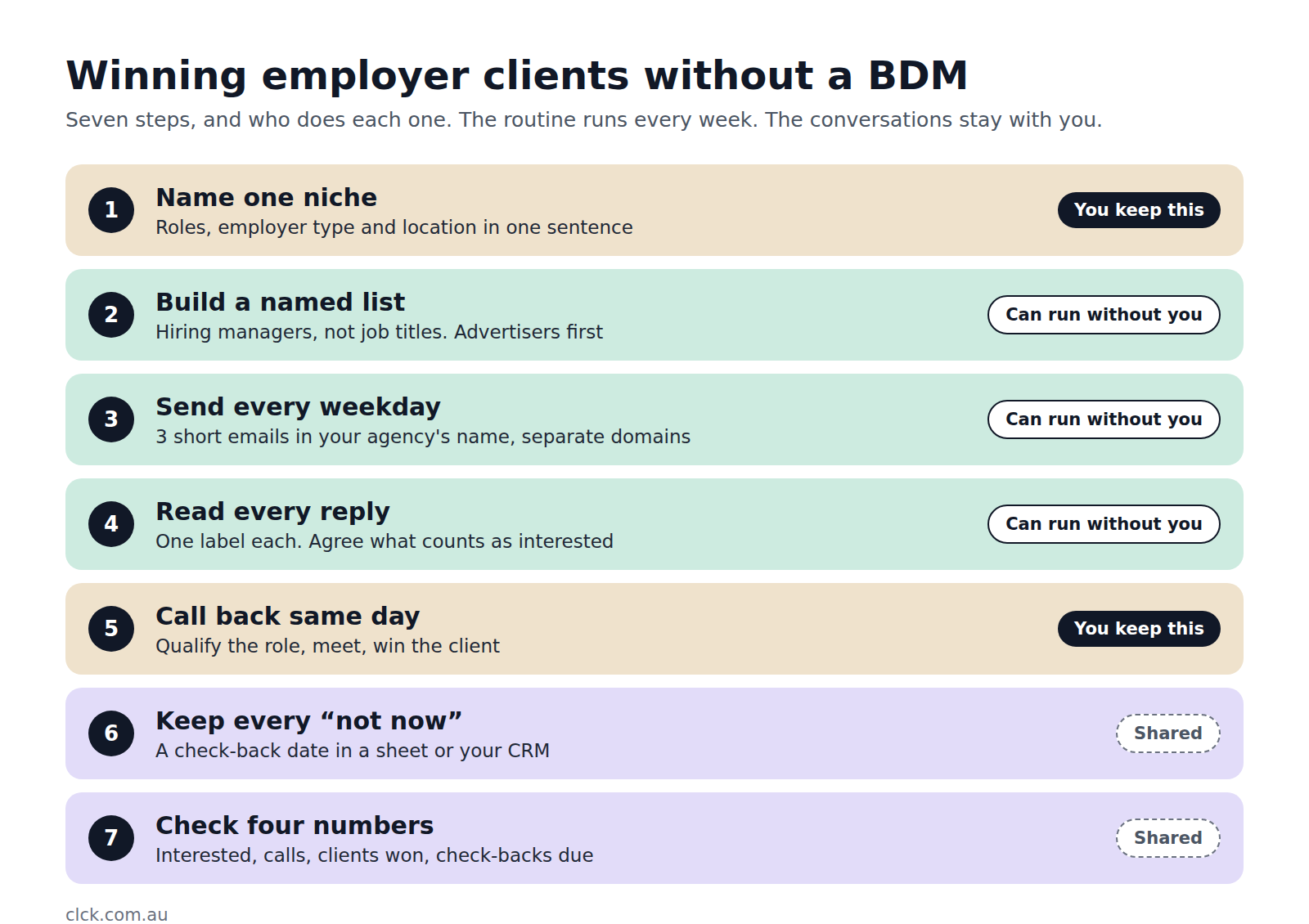
Why a small agency doesn't need a BDM to fix this
Most small agencies win clients through referrals and whoever the director has time to call. Then the roles go live, everyone's flat out filling them, and business development stops. A month later the roles are filled and the pipeline's empty.
Hiring a BDM looks like the obvious fix. It's a full salary from day one, the new person takes months to get going, and the outreach stops when they're on leave or move on. Our guide to what outsourced business development costs a recruitment agency puts the numbers side by side.
But look at what a BDM in a small agency actually spends the week on. In our experience, most of it is finding employers, finding the right person at each one, writing to them, following up and chasing replies. That's routine work. It needs to be done every weekday, and it needs to be done well, but it doesn't need a senior salesperson. What does need someone senior is the conversation once an employer says yes, and in a small agency that's usually you.
So the job is to split the work. Put the routine on a schedule that doesn't depend on your spare time, and keep the conversations for yourself.
Step 1: Name one niche and the employers in it
Start by describing your niche in one sentence: the roles you fill, the kind of employer you fill them for and where. "We place aged care managers with residential providers in regional Victoria" is a niche. "We do a bit of everything" isn't.
Then look at your best clients: the ones who paid your full fee, hired more than once and were good to work with. Their industry, size, location and the roles they hire tell you which employers to go after next.
This matters more than any other step, because it decides whether your emails sound like they came from someone who knows the employer's world. A campaign that tries to cover accounting, aged care and logistics at once sounds like it came from nobody in particular.
Step 2: Build a list of named hiring managers, not job titles
Start with the employer, then find the person who feels it when a seat is empty. In a small business that's usually the owner or a director. In a bigger one it's often the operations manager or the head of the department, not always HR.
Put employers who are already advertising the roles you fill at the front of the queue. Then add the much bigger group who aren't advertising yet. Most of your market isn't hiring this month, and hardly anyone talks to them before they do. We go through how to find them, and the signals that an employer will hire soon, in how niche recruiters reach hiring managers before roles are advertised.
Keep the list to a size you can contact every month. A bought list of "HR managers in Sydney" is bigger and cheaper, and it gets you people who don't hire for your niche or left the company a year ago.
Step 3: Put outreach on a schedule that runs when you're busy
This is the step a BDM would normally own, and the one that stops first in a small agency. The fix is to make it independent of anyone's spare time.
Here's the setup we use:
- Short emails in your agency's name. Three short emails to each hiring manager, a few days apart, written the way you'd talk to them at an industry event. Name the roles you fill and ask one easy question, such as whether any roles like that are coming up.
- Sent every weekday. A steady amount every day, not a burst whenever someone has a quiet afternoon.
- From separate sending domains. Cold email never goes from your main domain, so your everyday email to candidates and clients stays out of junk.
- Stopped the moment someone replies. Nobody gets a follow-up after they've answered.
Don't judge it on the first email. In the campaigns we ran for Careers in Demand, an education and VET recruiter, about four in five interested replies came on the second or third email.
If you want to run this part yourself, our guide to setting up cold email for a recruitment agency and tracking it in HubSpot covers the domains, the three emails and the Spam Act rules in detail.
Step 4: Have someone read every reply, every working day
Replies are where cold email is won or lost, and they don't arrive on a timetable. Someone needs to read the reply inbox every working day and give each reply one label: interested, not now, referral, not interested, unsubscribe or out of office.
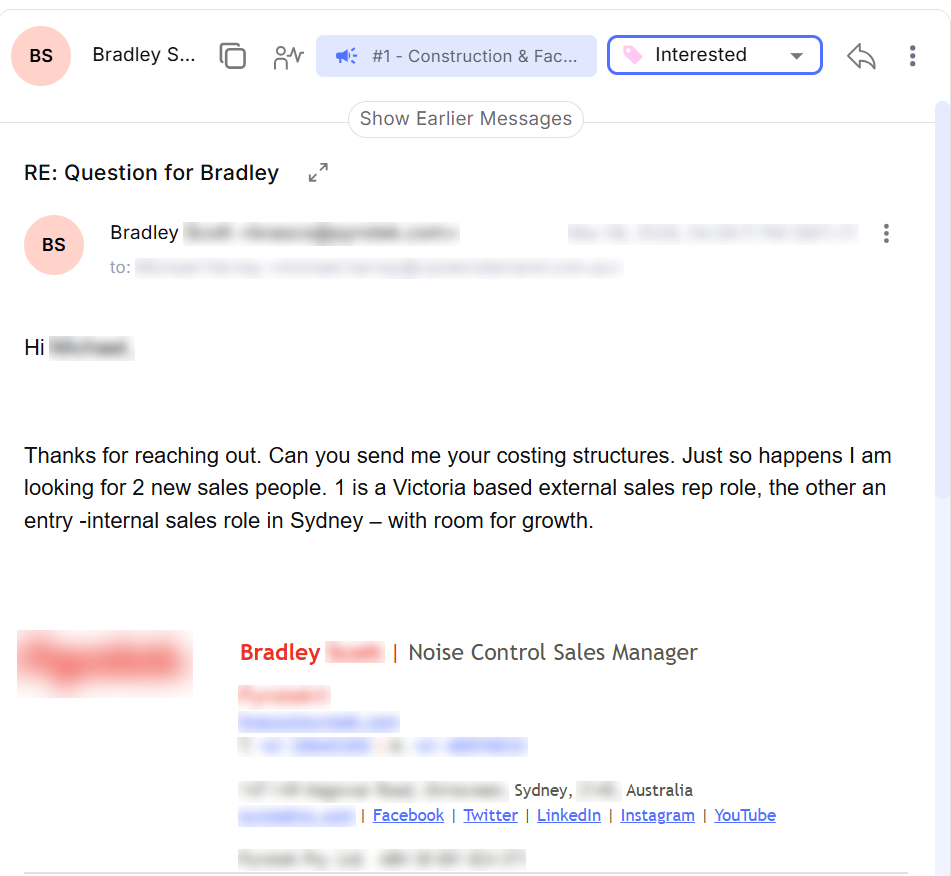
Agree in advance what counts as interested. We use this: a decision-maker at a target employer asks to talk, asks about candidates or fees, or sends you a role. Out-of-office replies and "not now" don't count.
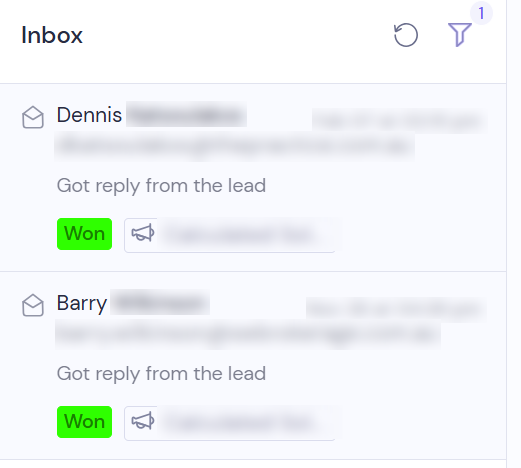
That definition keeps you from spending your time on polite replies that were never going anywhere. It also means the replies that reach you look like this one:
Step 5: Call interested employers back the same day
This is your job, and it's the one step you shouldn't hand to anyone. An employer who replies on Tuesday and hears back on Friday has usually found someone else.
Make it the one non-negotiable in your week. When an interested reply comes in, call or email back that day. Ask about the role, the timing, what's made it hard to fill and how they like to work with agencies. You're not selling at this point. You're doing what you already do well with any new client.
By default, we send every interested employer straight to the agency's own team rather than booking meetings on their behalf. The person who'll win the work is the one deciding whether the meeting is worth having, and the relationship is theirs from the first call.
Here's what that can look like. Mary B., Managing Director of Calculated Solutions, a financial services recruitment agency, sent our team this after her first meeting from a campaign:
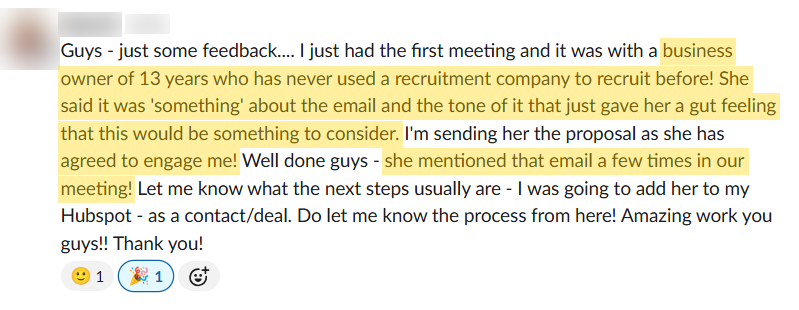
A business owner of 13 years who had never used a recruitment agency agreed to engage her, and mentioned the email a few times in the meeting. Notice what Mary planned next: send the proposal and add the new client to HubSpot as a contact and a deal. That's the right moment for a CRM to come in.
Step 6: Keep every "not now" in one place
Plenty of employers will reply with "not now, but keep in touch". That's not a rejection. It's an employer telling you they expect to hire again and are happy to hear from you.
Thank them, ask when it's worth checking back, and write the date down somewhere you'll see it. For Careers in Demand, four campaigns produced 96 interested employers plus 174 "not right now" replies to go back to (read the case study). Those 174 are next year's pipeline, as long as somebody follows up when they said they would.
You don't need a CRM for this. A spreadsheet with the employer, the contact, what they said and a check-back date will do. If you already use HubSpot, a contact with a check-back date and a task on that date does the same job, and our cold email and HubSpot guide shows a simple setup for it.
LinkedIn earns its place here too. Connecting with the hiring managers on your list and posting about what you're seeing in your niche won't fill your pipeline on its own, but it means your name is familiar when your next email or call arrives.
Step 7: Check four numbers every week
Once a week, look at four numbers:
- Interested employers: new replies that meet your definition.
- Calls held: how many of those you actually spoke to.
- Clients won: employers who signed your terms.
- Check-backs due: "not now" employers whose date falls this month.
Leave open rates out of it. An open tells you nothing about whether an employer wants to work with you.
Then close the loop. Tell whoever writes the emails which replies turned into work, so the next round goes to more employers like them. Without that feedback, the targeting never gets sharper.
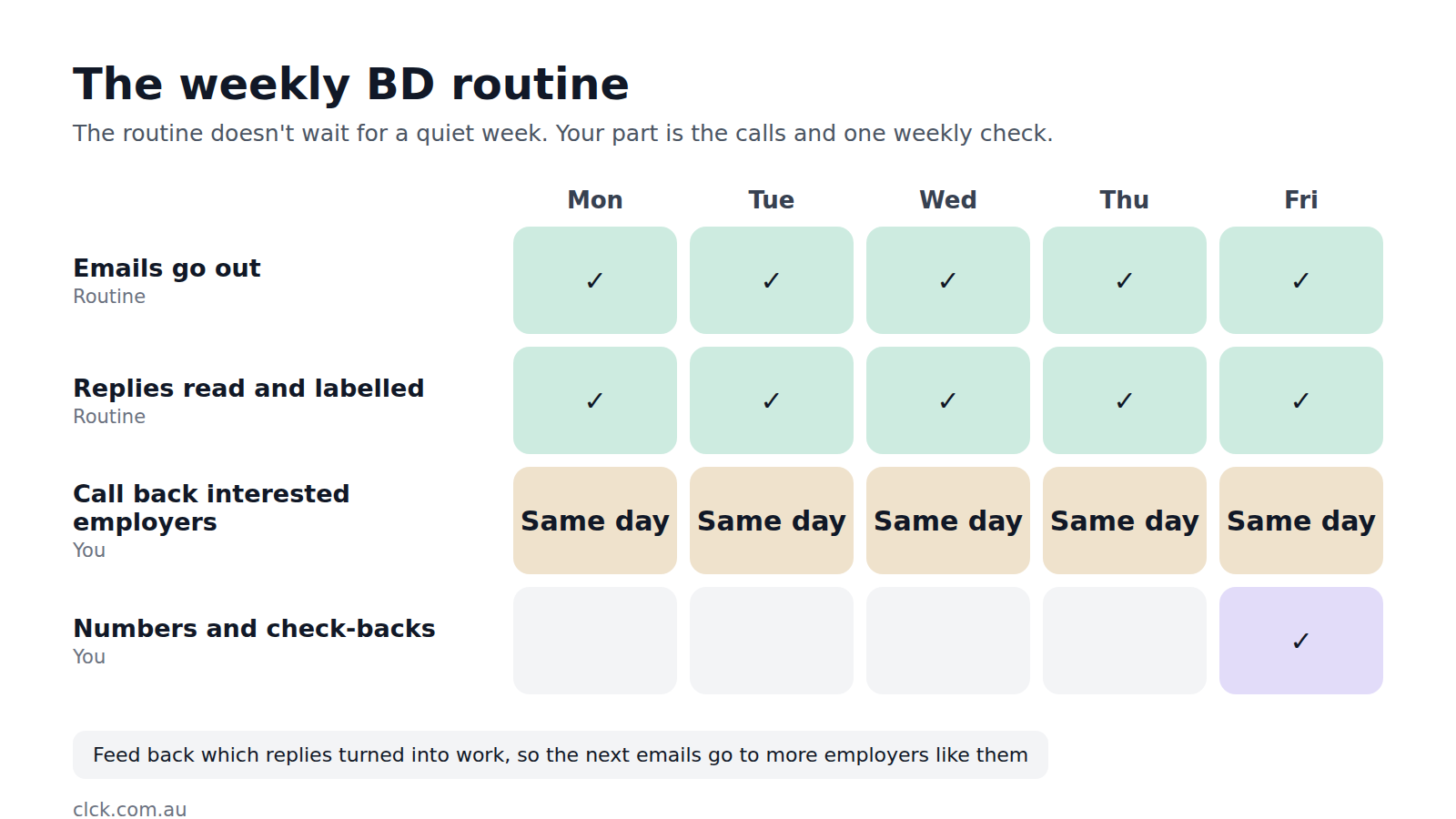
What to keep, and what to hand over
You can run all seven steps in-house, and some owners do it well. The trouble is that Steps 2 to 4, the list, the sending and the reply inbox, take the most hours and are the first things to slip when every desk is busy.
That's the split we use in our recruitment work. We find the hiring managers in your niche, write and send the emails in your agency's name every weekday, read every reply and send interested employers straight to your team with an alert. You approve the audience and the messages, call back the employers who want to talk, and tell us what turns into work. Your part at the start is about an hour, so we can get across your niche, the roles you place and what makes you different. After that, it's the calls.
Whether that's worth paying for depends on your agency. If BD already runs every week and referrals keep every desk full, keep doing what works. We cover how to decide in is outsourcing business development worth it for a recruitment agency?
What it looks like when it works
One recruitment firm we work with signed 6 new clients in 15 days from its first 20 positive replies, and 10 clients in total from that campaign. Across four 2026 campaigns, Careers in Demand heard from 96 interested employers and has made 8 placements so far.
Mary's summary was short: "Within the first month of our first campaign, I started securing clients."
Your results will depend on your niche, your fees and how fast your team calls back. The same routine does very little for an agency that leaves interested replies sitting for a week. If you want to see whether email suits your niche at all, start with does cold email work for recruitment agencies?
Questions agency owners ask
Do I need HubSpot or another CRM to do this?
No. A spreadsheet covers the list, the replies and the check-back dates for a small agency. A CRM earns its keep once you have enough interested employers that things start slipping between inboxes. We've been HubSpot partners for more than ten years, so if you already use it, we fit around how you work.
Can LinkedIn replace email for winning employer clients?
Usually not on its own. LinkedIn builds familiarity over months, and a pitch in a direct message from a stranger is easy to ignore. It works best alongside direct outreach, so the hiring manager has already seen your name when your email lands.
When does hiring a BDM make sense?
When you want someone in the market full time: at industry events, running client meetings and building relationships in person. Outsourced outreach doesn't replace that. It covers the part that takes the most hours, so you can decide on a BDM later, when the pipeline justifies one.
How much of my time does this take?
If you run it yourself, budget time every weekday for sending and replies, plus the calls. If you hand the outreach over, your part is the calls with interested employers and a weekly look at the numbers.
Will cold email hurt my agency's reputation?
It can if it's done badly: bought lists, generic emails or sending from your main domain. Approve every message before it goes out, keep it short and relevant to the employer's roles, and send from separate domains in your agency's name.
Next step
If you'd like to see how many hiring managers in your niche we could reach, apply for a free planning session on recruitment.clck.au. It takes about a minute. If you'd rather talk through your wider business development first, book a strategy session.