
HubSpot announced 134 updates at UNBOUND 2026 in September. If you run a HubSpot portal, you can safely ignore most of them for now.
One change sits underneath all the rest, and it decides how well every new AI feature works for you. Below we cover that change, the three features we'd look at first, which plans include what, and the order we'd tackle it in.
Jump to:
- The 60-second version
- Context comes first
- Three worth a look
- Which of these do I already have?
- Everything else, by team
- Credits in plain English
- What we'd do this month
- Questions we're getting
The 60-second version
Three big themes
- Context comes first. HubSpot's AI now works from what it knows about your business. The CRM fills itself in from your calls, emails and meetings, and a new screen, Context Home, lets you see and correct what it's learned.
- AI that does the work. New agents prospect, write nurture emails, answer customer questions and chase overdue invoices, and Agent Builder lets you make your own. Most of them use HubSpot credits.
- More of your business in one place. Campaigns in Marketing Studio, projects in HubSpot Work (in beta), and contracts and payments in Revenue Hub.
Three worth a look
- Context Home: every HubSpot plan, including free.
- Deal Progression: Sales Hub or Service Hub Professional and up, in public beta.
- Marketing Studio: Marketing Hub Professional and up, in public beta.
Context comes first
HubSpot calls it Growth Context: everything HubSpot knows about your business, your customers and your team. Every new AI agent reads it before it writes an email, scores a lead or updates a deal.
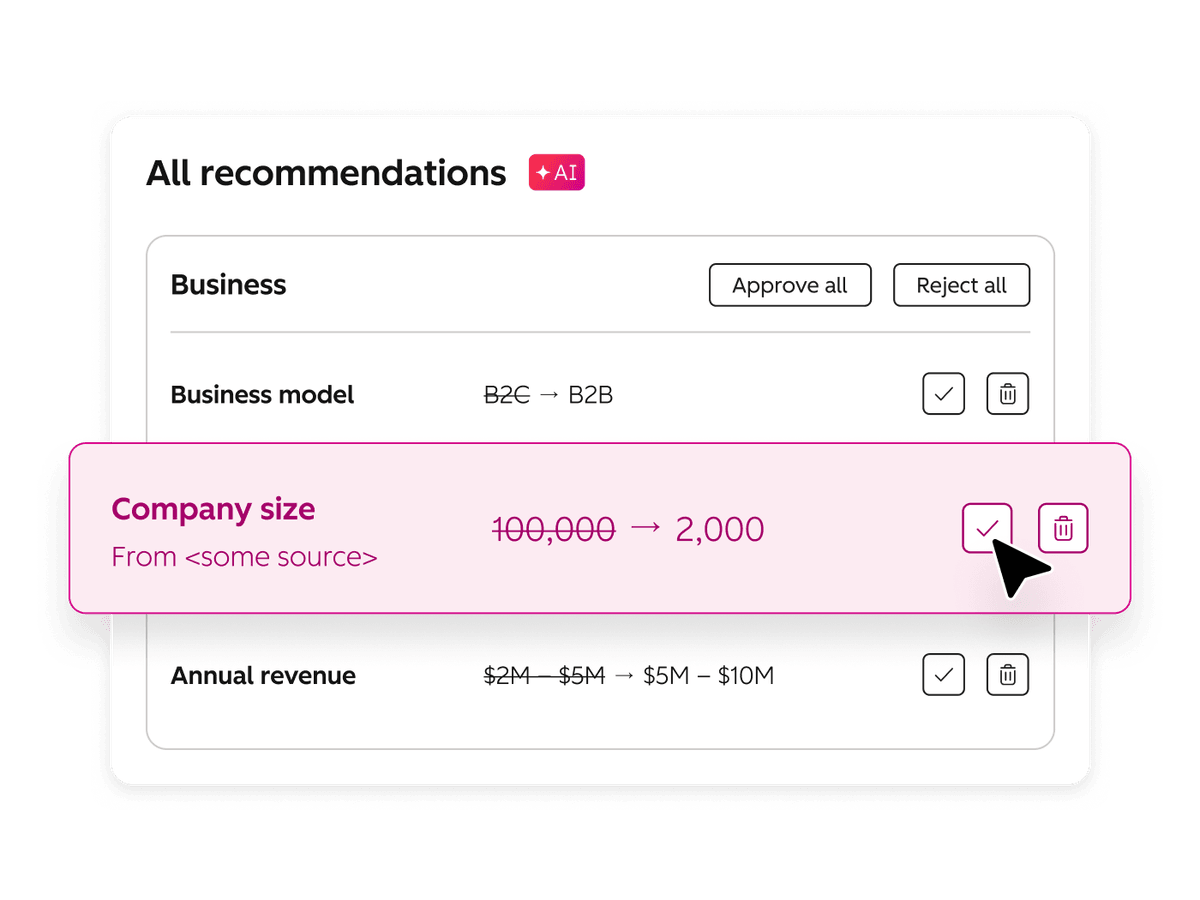
Two things feed it. First, the CRM now captures calls, emails and meetings and keeps records current from them. HubSpot calls this the self-updating CRM. Second, there's Context Home, the screen where you can see what HubSpot has worked out about your business, and fix it.
This matters because the AI is only as good as that picture. If it's thin, generic or out of date, every feature built on it starts from a bad brief. You'll notice it as AI emails that could have come from any company, lead scores that don't match who actually buys from you, and campaign plans aimed at the wrong people.
HubSpot's own figures put a number on it. Compared with customers whose context is poor, customers using its AI with high-quality context close 4.7 times more deals, generate 5 times more MQLs and resolve 6.8 times more support tickets. Those are HubSpot's numbers about its own customers, so treat them as a sign of direction. Your results will depend on your data.
Try this now: the 10-minute Context Home check
In HubSpot, go to Agents > Agent Hub and open the Context tab. You'll need Super Admin permission to edit most of it.
Read each section as a stranger would:
- Business: does it describe what you actually sell, who you sell to and how you make money? Is your brand kit (voice and tone) filled in?
- Customers: are your ideal customer profiles and personas there, and would your sales team agree with them?
- Team & Processes: if you have a sales methodology, is it there?
- Personal: each user can set their own email style, such as one for cold outreach and another for closing.
- Custom: anything important that doesn't fit elsewhere, like the jobs you don't take on or how you price.
If anything's wrong, missing or out of date, fix that before you switch on another agent.
Three worth a look
1. Context Home
What it does: one screen showing what HubSpot knows about your business, customers and team, where you can correct it. Every HubSpot AI tool reads from it.
Who it suits: everyone. It costs nothing and takes minutes.
Which plan: HubSpot says it's included in every edition. On Starter, Professional and Enterprise you'll find it in Agent Hub.
What we'd check first: who owns it. Context goes stale the moment your offer, pricing or ideal customer changes. Give one person the job of reviewing it every quarter.
More from HubSpot: Context Home product page | How to manage context
2. Deal Progression
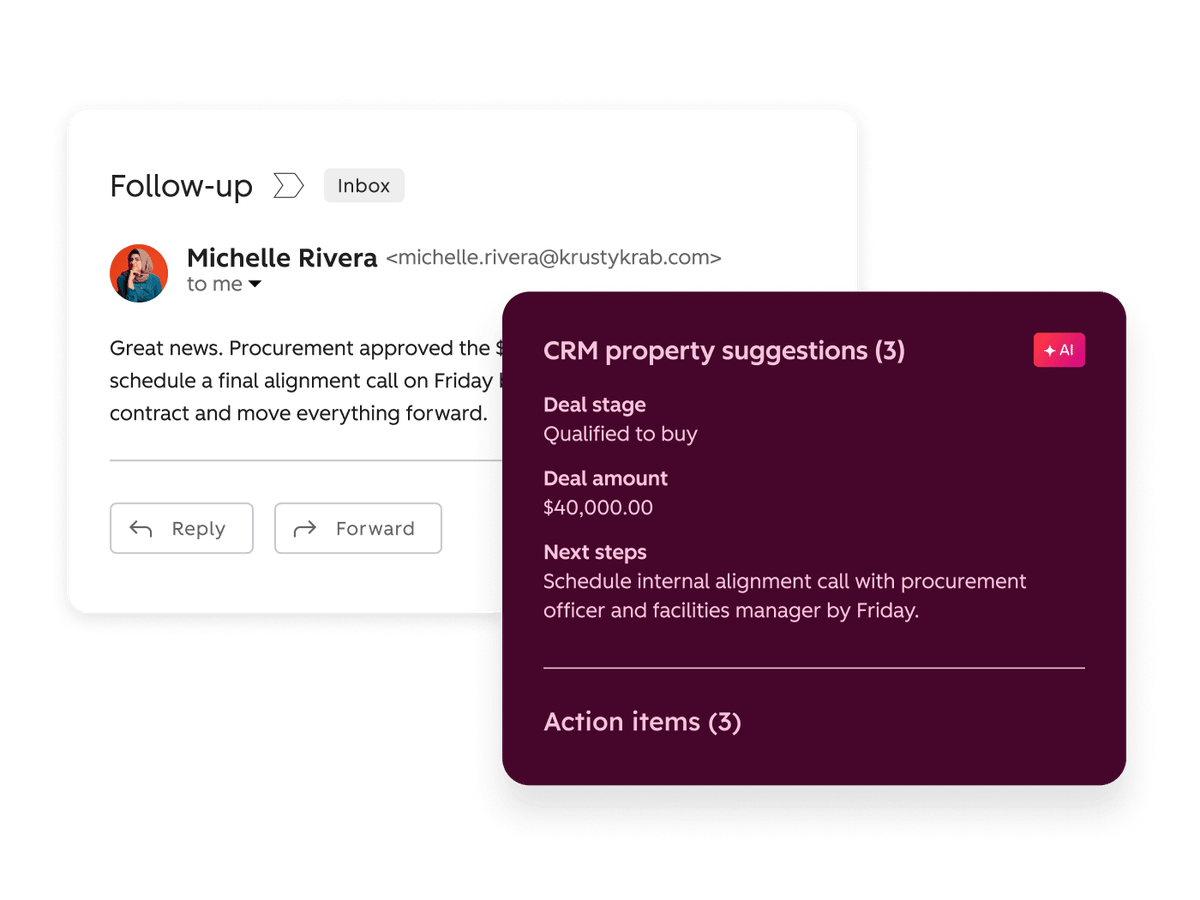
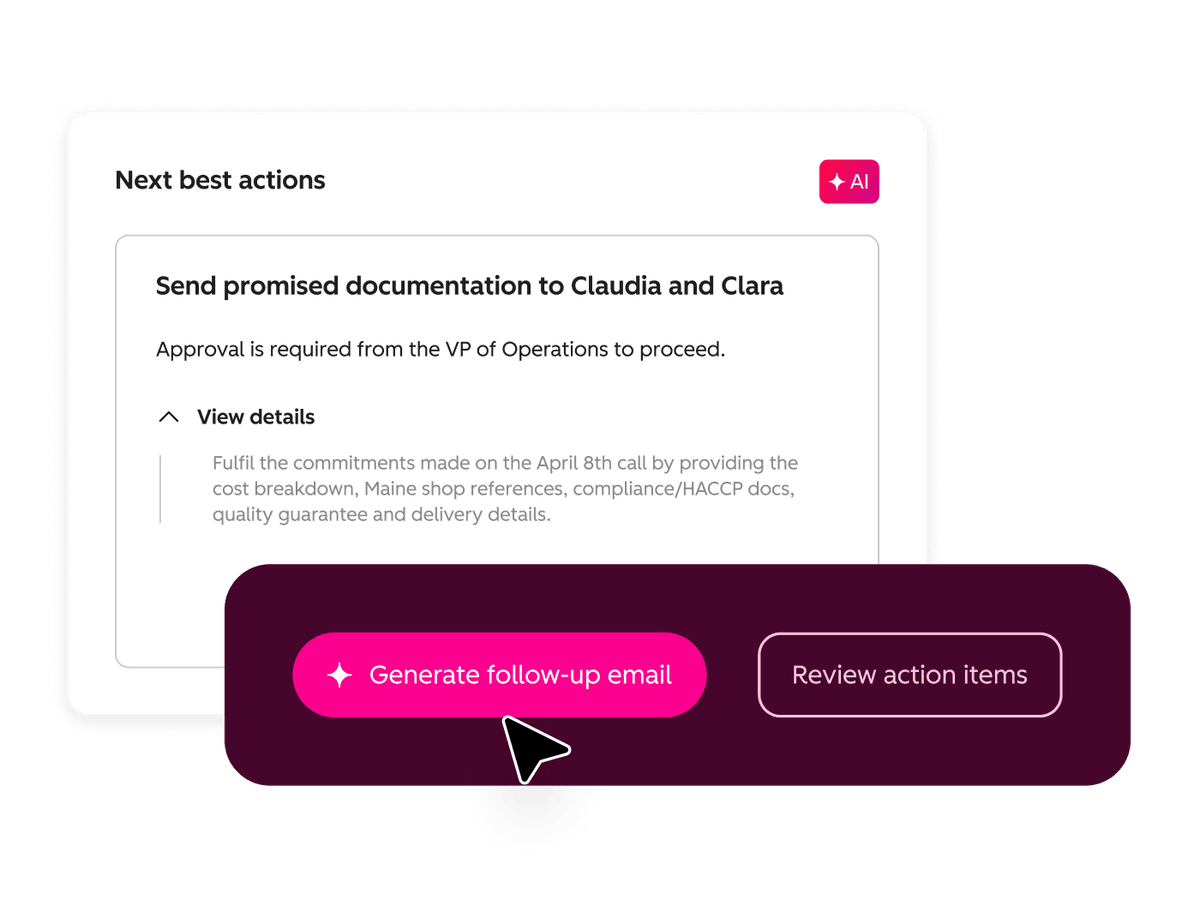
What it does: it reads the emails, calls and meetings logged on a deal, recommends the next step, drafts the follow-up and suggests updates to the deal's properties. Your reps review each suggestion before it's applied.
Who it suits: sales teams where the CRM is always a week behind reality, or where follow-ups slip between meetings.
Which plan: Sales Hub or Service Hub Professional or Enterprise, with an assigned Sales or Service seat. It's in public beta, so a Super Admin has to opt in first.
What we'd check first: it needs conversations to read. HubSpot's setup asks for Notetaker connected to Zoom, Microsoft Teams or Google Meet with recording and transcription switched on, or your existing notetaker connected instead. Updates to HubSpot's standard deal properties don't use credits. Updates to your custom properties do.
How we'd test it: two reps for two weeks. Compare how quickly follow-ups go out and how much editing the suggestions need.
More from HubSpot: Deal Progression product page | Set up Deal Progression
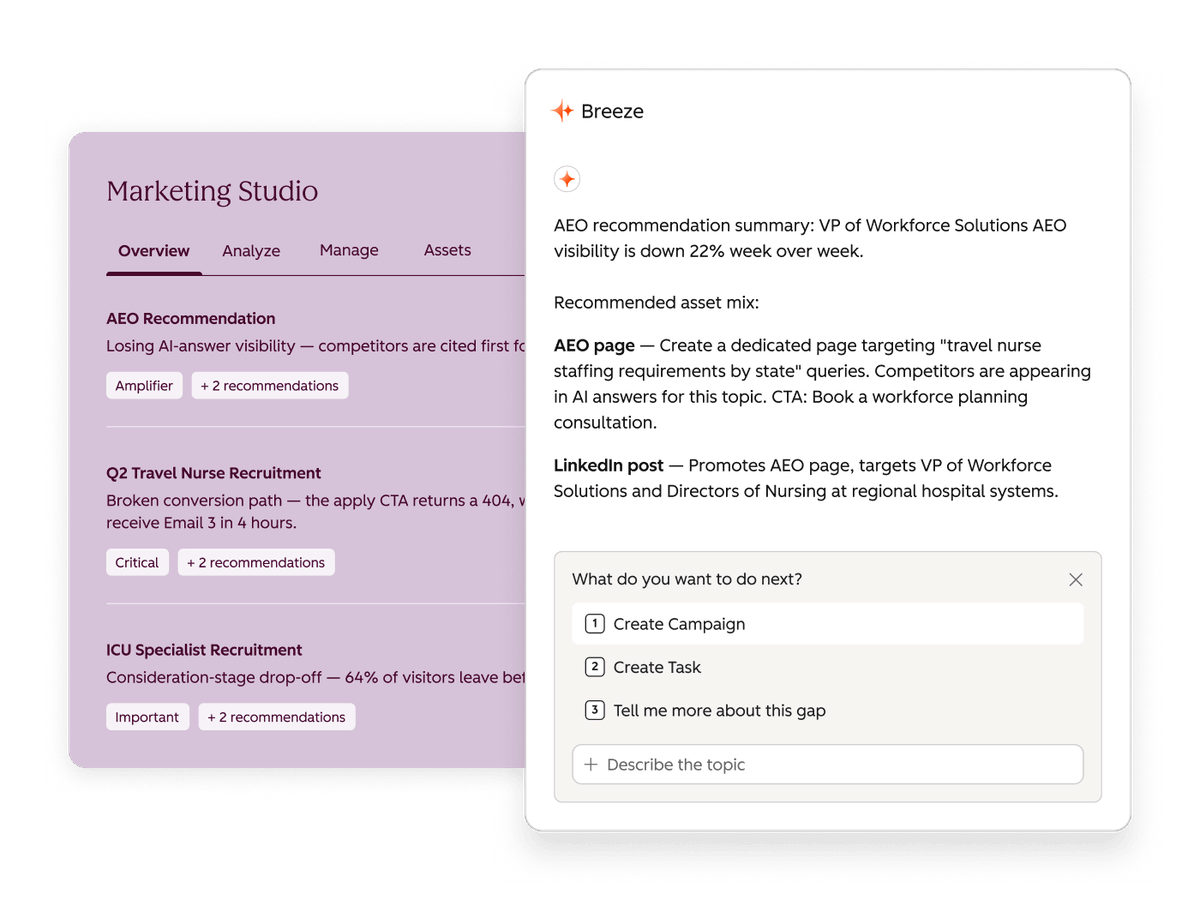
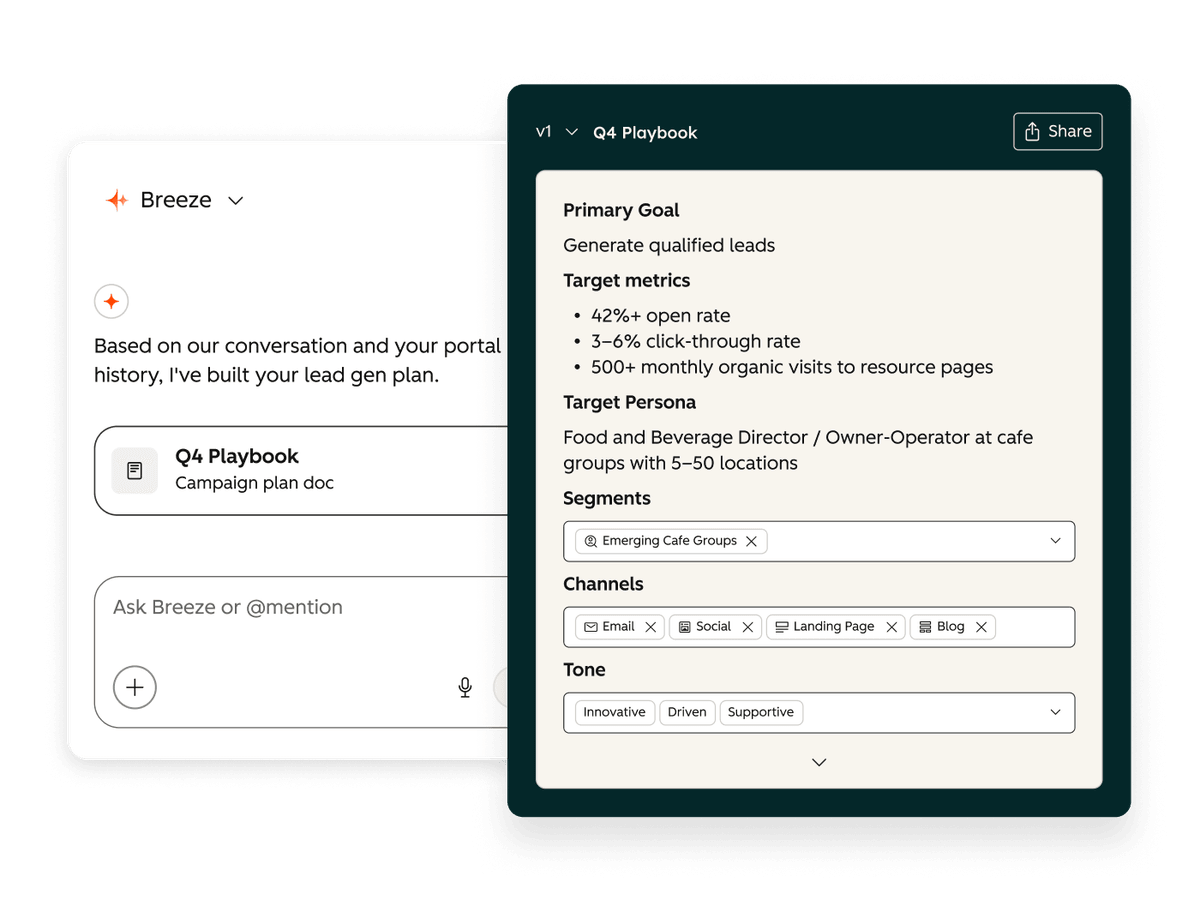
3. Marketing Studio
What it does: one workspace to plan, build, launch and report on a campaign, working through it in conversation with Breeze Assistant. Inside it:
- Campaign Agent turns a goal into a campaign plan with channels, message and assets.
- Content Agent drafts blog posts, LinkedIn posts and landing pages from your brand voice and audience data.
- Nurture Agent tailors each nurture email to the person receiving it.
Who it suits: small marketing teams who plan in a document today and then build across several tools.
Which plan: Marketing Hub Professional or Enterprise, in public beta. Content Agent and Nurture Agent use credits, and so do some Campaign Agent features.
What we'd check first: the agents write from your context, so do the Context Home check before your first campaign. Then keep a person in charge of the offer, the claims and the final emails.
More from HubSpot: Marketing Studio product page | Use Campaign Agent in Marketing Studio
Which of these do I already have?
| Feature | Plans that include it | Uses credits? | Status |
|---|---|---|---|
| Context Home | Every plan, including free | Not listed | Available |
| Data model health check | Every plan | Not listed | Available |
| HubSpot connector for Claude | Every plan | Not listed | Available |
| Revenue Agent (chases overdue invoices) | Every plan | Yes, to send invoices | Public beta |
| Agent Hub | Starter, Professional, Enterprise | Many agents do | Available |
| Prospecting Agent | Starter, Professional, Enterprise | Yes | Available |
| HubSpot Work (projects) | Starter, Professional, Enterprise (seat needed) | Some features | Public beta |
| Agent Builder (your own agents) | Professional, Enterprise | Some features | Available |
| Deal Progression | Sales Hub or Service Hub Professional, Enterprise (seat needed) | Custom property updates only | Public beta |
| Marketing Studio and Campaign Agent | Marketing Hub Professional, Enterprise | Some features | Public beta |
| Content Agent | Marketing Hub Professional, Enterprise | Yes | Public beta |
| Nurture Agent | Marketing Hub Professional, Enterprise | Yes | Public beta |
We checked this against HubSpot's knowledge base on 9 October 2026. HubSpot changes plans and beta status often, so check a feature's own page before you plan around it.
Everything else, by team
The rest of the 134, grouped by who'd care. Most are worth knowing about rather than acting on today. HubSpot's Spotlight page has the full list.
Marketing
- Ads in ChatGPT and Reddit (both public beta) and Microsoft Advertising, reported alongside your other ad channels.
- WhatsApp marketing campaigns, with templates and journeys (public beta).
- Workflows that start the moment a social post publishes (public beta).
- All your ad leads in one place, with sync status and error fixes (public beta).
- A simpler summary view of your lead scoring rules.
Sales
- Prospecting Agent now finds contacts on demand and learns from the edits your reps make.
- More buying signals: job changes from UserGems, research surges from Bombora, and a churn-risk signal drawn from emails, calls and notes.
- Deal Plans: shared plans with the buyer on milestones, owners and deadlines (public beta).
- Meetings Calendar: past and upcoming meetings in one HubSpot calendar.
Service
- Customer Agent answers questions across chat, email, voice and social, and now handles payment links and invoice questions. It uses credits only when it resolves a question.
Revenue and operations
- Revenue Agent sends tailored reminders for every overdue invoice and follows up as replies come in (public beta).
- Contracts created directly in HubSpot without a quote (public beta), plus price books and quote rules.
- HubSpot Work for projects such as onboarding and launches, with the customer's history attached (public beta).
- Cleaner data: the data model health check, a preview before you merge duplicates, and help writing duplicate rules.
- Buy now, pay later with Klarna and Affirm, for the US and Canada only.
AI and connections
- Breeze Assistant inside Gmail, drafting replies with your HubSpot context.
- The HubSpot connector for Claude, for building campaigns and checking attribution from Claude.
- An expanded HubSpot MCP server, the connection that lets outside AI tools read and update more of HubSpot.
Credits in plain English
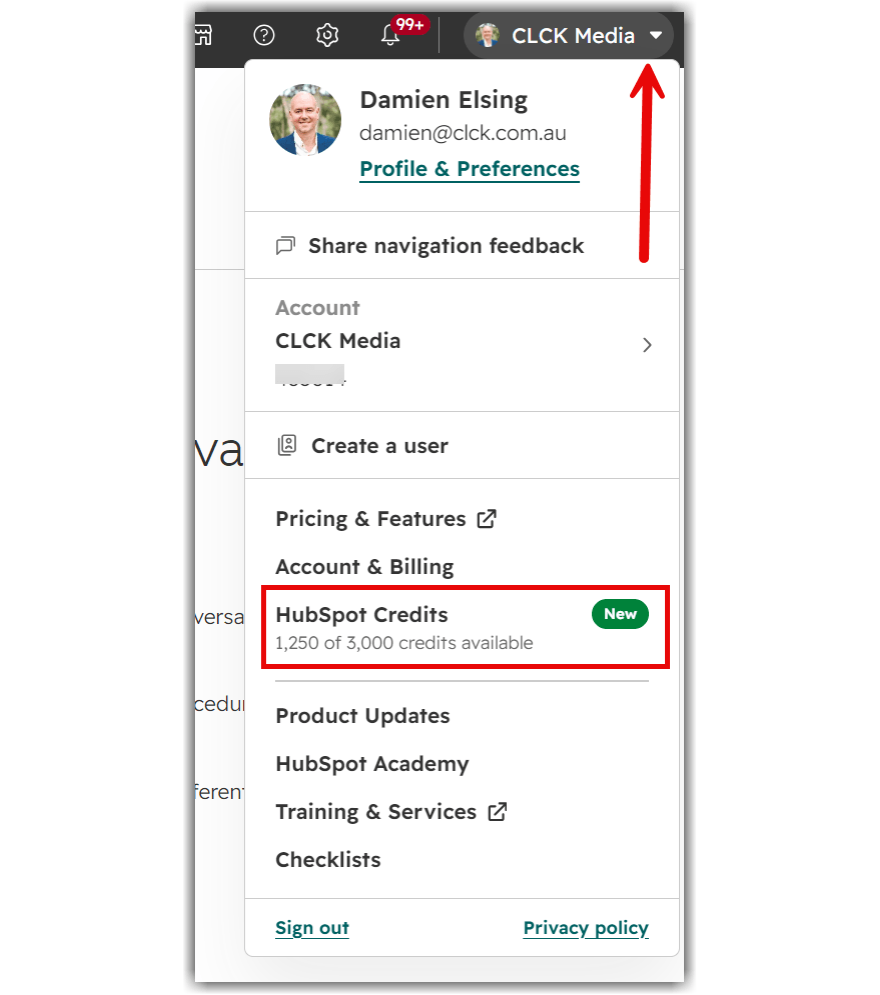
Credits are how HubSpot charges for AI work: an agent drafting an outreach email, Customer Agent resolving a question, or Deal Progression updating a custom property.
If you're on HubSpot's seat-based pricing, your Starter, Professional or Enterprise plan comes with a monthly allowance. Unused credits don't roll over. When you run out, credit-based features pause until the next reset unless you buy more.
Most portals we look at aren't using their included monthly credits at all. That makes the features above a good place to put them to work, one at a time. Pilot one agent, watch its usage for a month, then decide on the next.
To see your balance, open the account menu at the top right of HubSpot. Admins can also set a credit limit for each feature.
What we'd do this month
- Check your context. Ten minutes, any plan. Use the checklist above.
- Tidy the data it reads. Run the data model health check, merge your duplicates, and fill the gaps in the lifecycle stages and deal properties your team relies on.
- Pilot one agent on one real job. Pick the one tied to a problem you already have. If follow-ups slip, start with Deal Progression. If campaigns are slow to get out the door, try Marketing Studio. If your inbox is full of the same questions, look at Customer Agent.
- Measure it before you add more. Track time saved, how much editing it needs and the credits it uses.
Safe to ignore for now
- Anything that needs a plan upgrade you weren't already considering.
- Agent Builder, until one of HubSpot's own agents is earning its keep.
- New ad channels you don't already run.
- Buy now, pay later, which is US and Canada only for now.
Questions we're getting
Is Context Home free?
Yes. HubSpot says it's included in every edition, including the free CRM.
Do the new agents cost extra?
Most use HubSpot credits. Paid plans include a monthly allowance, and you can buy more if you need it.
What's still in beta?
As of 9 October: Deal Progression, Marketing Studio and its Campaign, Content and Nurture Agents, HubSpot Work, Revenue Agent, WhatsApp marketing and several of the new ad features. Beta features can change, and some need a Super Admin to opt in.
Does this all work in Australia?
The only region limit we found on HubSpot's Spotlight page is buy now, pay later, which is US and Canada only. Beta features can reach accounts at different times, so check inside your portal.
Do I need a partner to set this up?
No. You can do the Context Home check and the data health check yourself. Where we help is deciding what's worth switching on, fixing the data underneath it, and setting up a pilot you can measure.
Want to know what's worth switching on in your portal?
We'll look at how your HubSpot is set up and tell you which of these you've already got, what to switch on, what needs fixing first and what to ignore.