
If you use HubSpot, Projects is worth another look.
Not because it suddenly replaces ClickUp, Monday, Asana or a proper delivery tool. It doesn’t.
The better reason is simpler: some work is easier to manage when it sits close to the customer record.
For years, most teams used HubSpot for sales, marketing and customer data, then sent delivery work somewhere else. That still makes sense for a lot of teams. If your delivery team already runs well in a dedicated project tool, don’t rip that out just because HubSpot has Projects.
But if your work keeps getting split across deals, tasks, notes, inboxes, spreadsheets and Slack threads, HubSpot Projects may help.
The question isn’t, “Can HubSpot run our whole delivery team?”
A better question is, “Is there one customer workflow that would be clearer if the project lived inside HubSpot?”
That’s where Projects starts to make sense.
What HubSpot Projects is now
HubSpot Projects is now a CRM object.
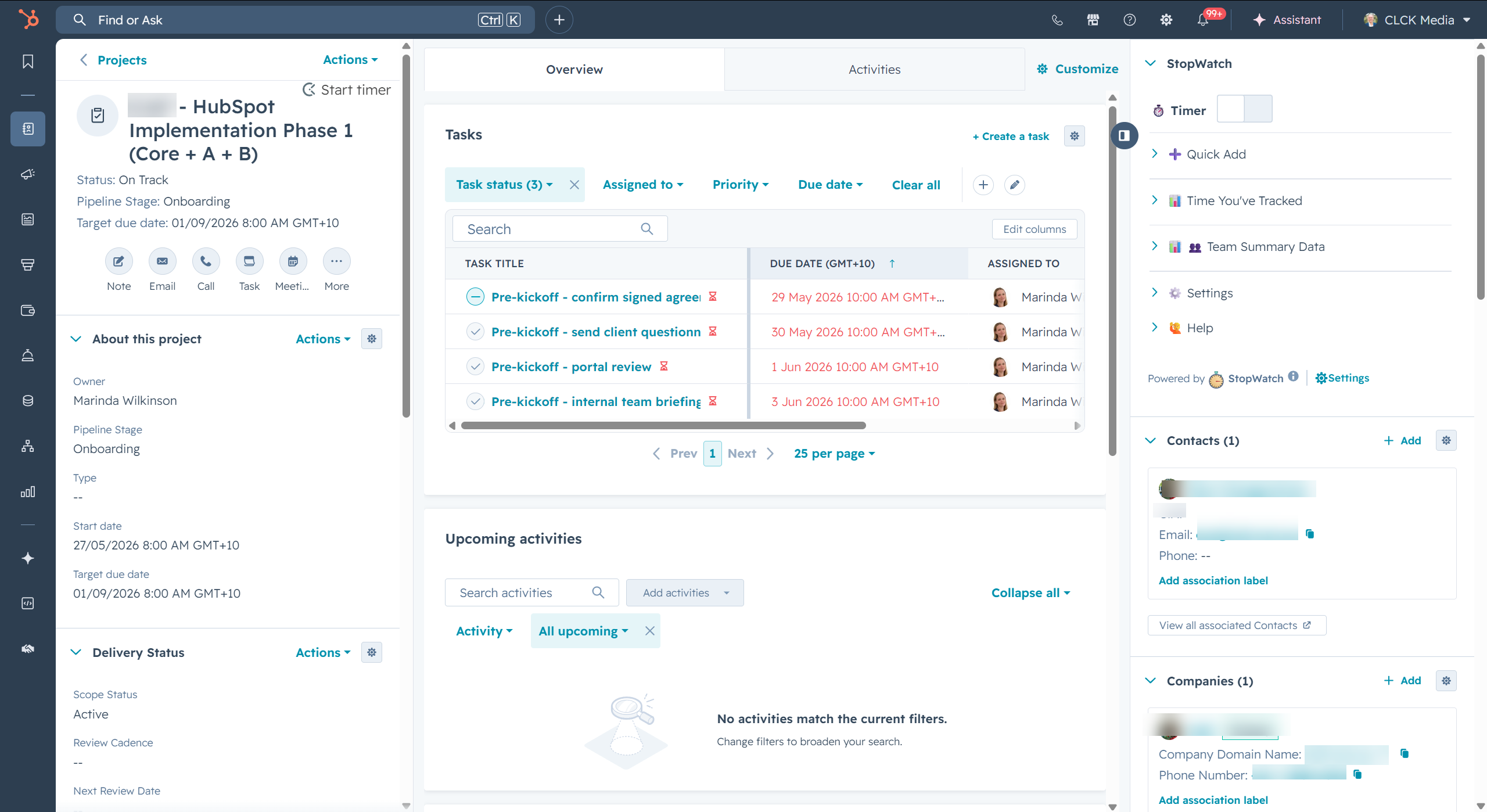
In plain English, that means a project can be treated like a real record in HubSpot. It can have fields, stages, tasks, notes, associations and views around it.
That’s different from a loose checklist.
A project can sit near the deal that started the work. It can sit near the company, the contacts, the tasks, the notes and the activity history. So when someone asks, “What’s happening with this customer?”, the answer is easier to find.
At the time of writing, HubSpot’s own docs show Projects can connect with other CRM records and appear in areas like views, reports, workflows and lists, depending on your HubSpot setup and feature access.
That last part matters.
Some features depend on your subscription, seats, permissions and beta access. So don’t sell this internally as, “Everyone gets everything.” Start by checking what your portal can actually do.
Why this matters
Most project tools are good at managing work.
HubSpot is good at holding customer context.
The problem starts when those two things drift apart.
The deal notes are in HubSpot. The project tasks are somewhere else. The handover call is in a doc. The key contact is buried in an email. The sales team wants to know if onboarding is delayed. The delivery team wants to know what was promised.
Nobody is doing anything wrong. The system is just split.
When the project sits in HubSpot, more of that context can stay in one place.
You can ask simple questions:
- Which company is this project for?
- Which deal created the work?
- Who needs to be kept in the loop?
- Which tasks are attached to the project?
- Which notes should the next person see?
- What stage is the project in?
- What fields does the team need for handover or reporting?
That’s the real appeal.
Not more software. Less hunting.
What has changed enough to revisit
If you looked at HubSpot Projects a while ago and ignored it, that reaction may still be fair.
Older versions felt too light for many teams. It was easy to see Projects as a simple task list and move on.
It’s worth checking again because Projects now sits more clearly inside HubSpot’s CRM structure.
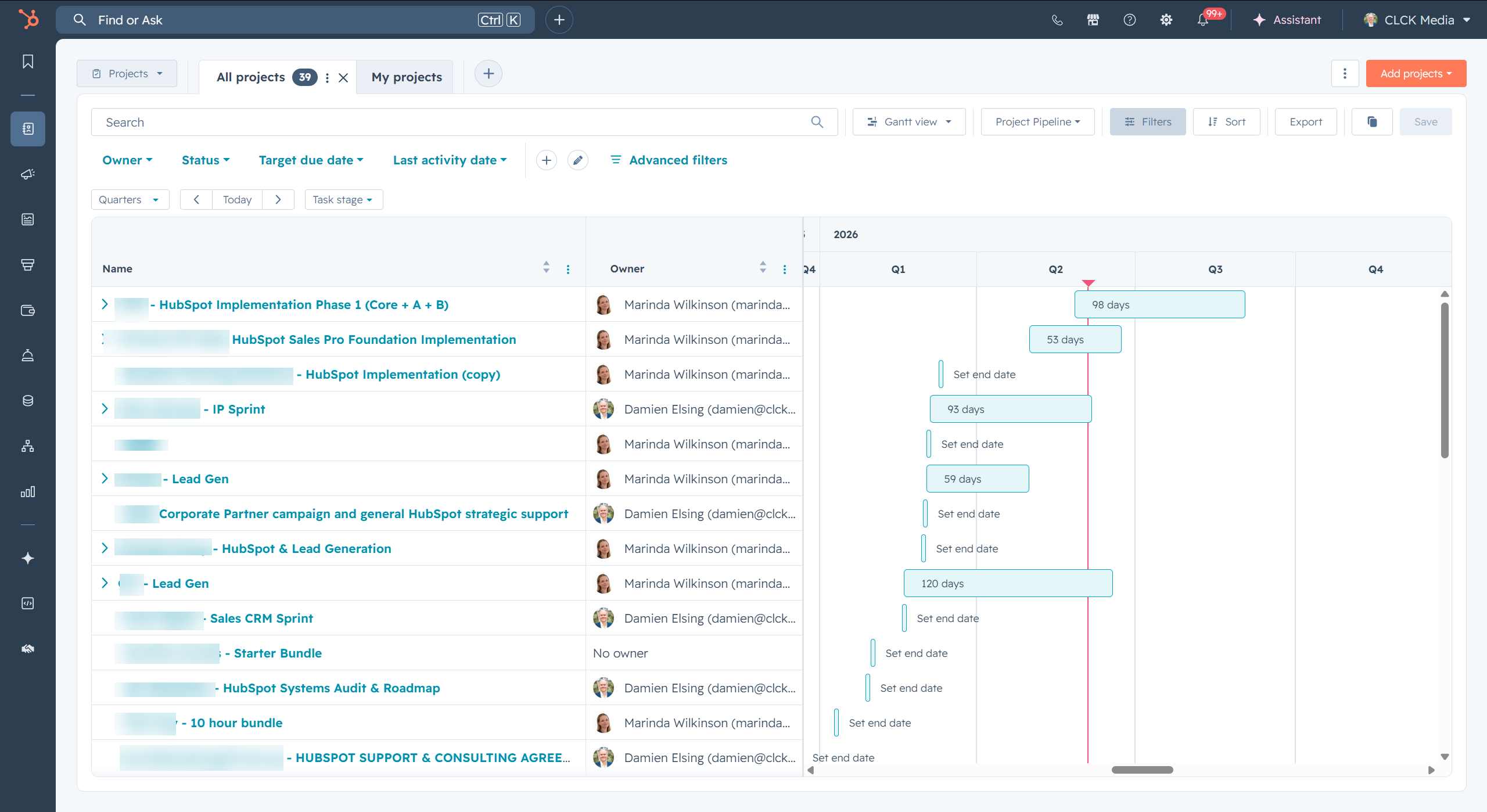
You can work with project records, project properties, pipelines and stages. You can associate projects with other records. You can use board, table and Gantt-style views. Depending on your setup, you may also have access to subtasks, association labels and workflow actions.
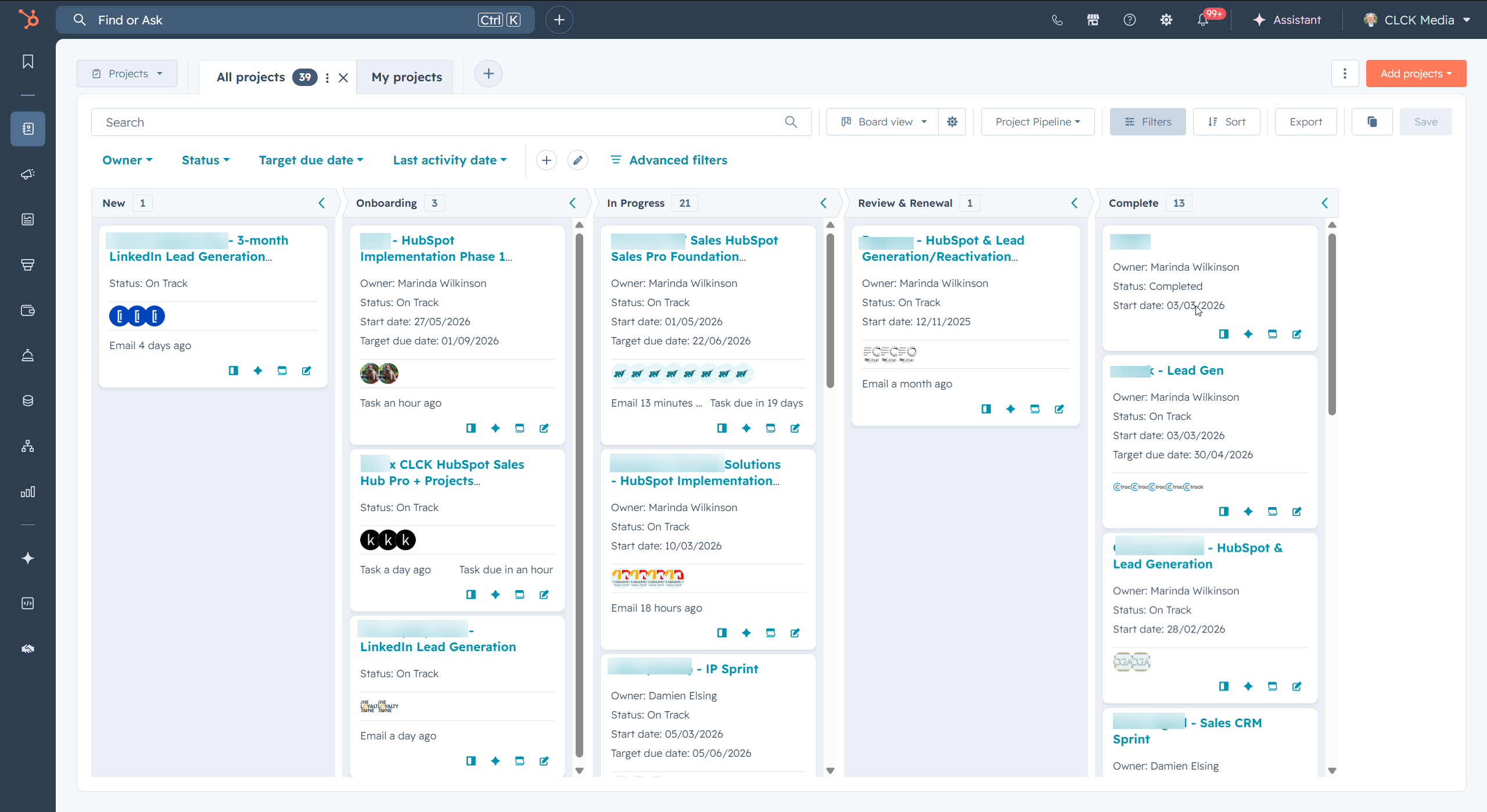
The views are one of the easiest aha moments. A board helps the team see workflow stage. A table helps with filtering, ownership and field review. A Gantt-style view helps people see timing across many projects without leaving HubSpot.
That doesn’t make HubSpot a full delivery platform.
But it does mean Projects is no longer something to dismiss without testing.
A good test is not, “Does this have every feature our project tool has?”
A good test is, “Would this make one CRM-connected workflow easier for the team?”
Where HubSpot Projects fits well
Projects fits best when the work is part of the customer relationship.
That often means:
- new client onboarding after a deal is won
- simple implementation work
- sales to delivery handover
- customer success projects
- renewal or expansion work
- internal checklists linked to customer records
- service delivery where status matters more than deep resource planning
In these cases, the project record can become a home for the important context.
You might link it to the company, the deal, the right contacts, the tasks and the notes. You might use a simple project pipeline so the team can see where things are up to. You might add only the fields the team needs, not a giant admin form nobody wants to maintain.
That same record-level context is the real difference: associations, activity and tasks help the project sit near the CRM records it depends on.
The win is not that HubSpot has every project management feature.
The win is that the project is close to the CRM record your team already uses.
For a service business, that can be enough to reduce a lot of friction.
Where it doesn’t fit
HubSpot Projects is not the right home for every kind of delivery work.
If your team needs heavy project operations, a dedicated tool will usually be better.
Keep using a proper project platform when you need:
- detailed resource planning
- complex dependencies
- workload management across many people
- project finance, margin or billing controls
- deep client collaboration inside the project workspace
- complex templates across many delivery types
- portfolio management for a delivery team
That’s not a criticism of HubSpot. It’s just a fit question.
HubSpot is strongest when CRM context is the problem.
Dedicated project tools are strongest when delivery operations are the problem.
If your delivery tool is working well, keep it. Then look for the parts of the process where HubSpot context is missing.
A simple way to test it
Don’t start by moving everything.
Pick one workflow.
A good first test might be client onboarding after a deal is won.
Map the basics:
- What starts the project?
- Which company, deal and contacts should be linked?
- What stages does the work move through?
- Which tasks should sit on the project?
- What notes should be easy to find later?
- Which fields does the team really need?
- Who needs to see status without asking for an update?
Then run a few real projects through it.
After that, ask practical questions:
- Can delivery find the sales context faster?
- Can sales see status without chasing someone?
- Are tasks clearer when they’re tied to the project?
- Are notes easier to find later?
- Does reporting improve because project status is now CRM data?
- Is the setup simple enough for the team to keep using?
If the answer is yes, Projects may deserve a bigger role.
If the answer is no, that’s still helpful. It may tell you that HubSpot should be the visibility layer, while your project tool remains the delivery workspace.
Our view at CLCK
Our view is simple.
HubSpot Projects is worth testing when delivery work needs to stay close to sales and customer records.
We’ve been looking at where more delivery context can live inside HubSpot. The best reason isn’t novelty. It’s context.
Deals, companies, contacts, tasks, notes, fields and reports already live in the CRM. If the project also lives there, the team has fewer places to check before they understand what’s going on.
That can make a real difference for service businesses.
But keep the test honest.
Don’t ask, “Can HubSpot Projects replace our delivery tool?”
Ask, “Which workflow is messy because it sits too far away from HubSpot?”
That question usually leads to a better decision.
The practical next step
If delivery work is starting to sprawl across tasks, inboxes, spreadsheets and project tools, pick one workflow to test.
Start small.
Choose one project type. Map the records involved. Decide which contacts, companies, deals, tasks and notes need to be visible. Check your subscription, seats and beta access before assuming a feature is available. Then build the simplest version the team will actually use.
If it works, expand from there.
If it doesn’t, you haven’t wasted much. You’ve learned where HubSpot helps and where a dedicated project tool still makes more sense.
Either way, the decision gets clearer.
If you want help working out where HubSpot Projects fits in your sales and delivery process, you can book a strategy session here: https://www.clck.com.au/book-a-strategy-session/