
Real AI work is messier than the demo
Most AI demos look tidy because the task is small.
Write a paragraph. Summarise a page. Create a subject line. Answer one question.
That is not how complex business work usually arrives. A real request sounds more like this: create the article strategy, draft the full post, prepare images, add it to the site, check metadata, review internal links, scan the copy, run the right checks, stage it safely, and do not touch production.
One long AI thread can handle some of that for a while. Then the risk starts to build. The conversation gets long. The model forgets a constraint. It changes the wrong file. It duplicates work already done earlier. It says something is verified when it only looks finished.
That is not because AI is useless. It is because we are asking one thread to act like a strategist, project manager, researcher, writer, developer, QA reviewer and risk manager at the same time.
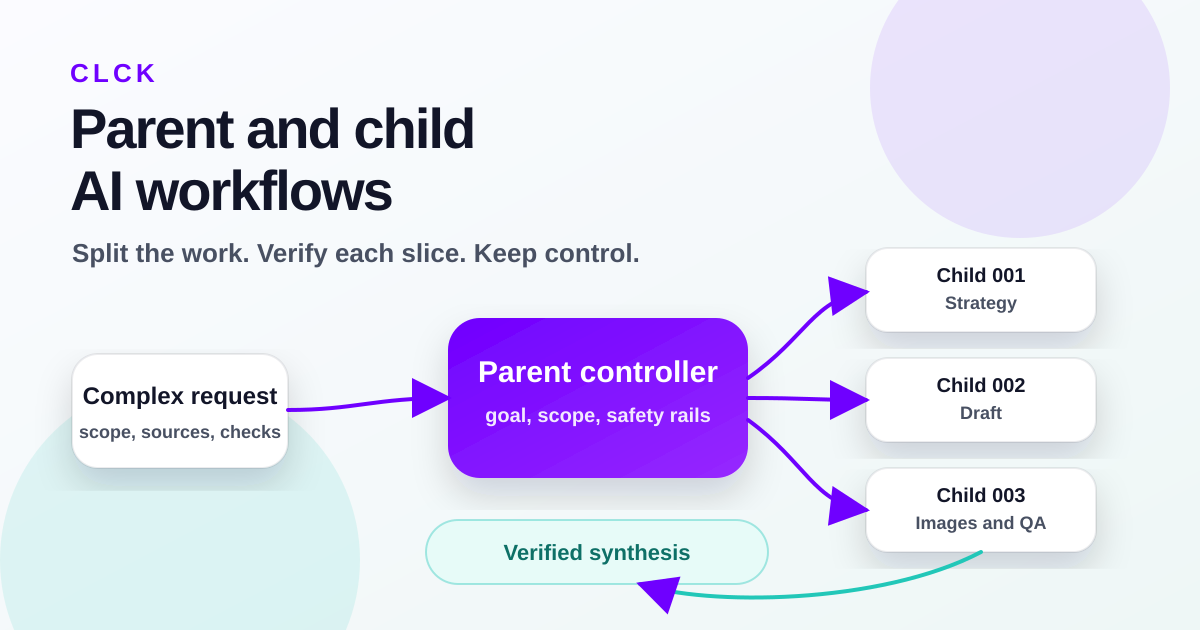
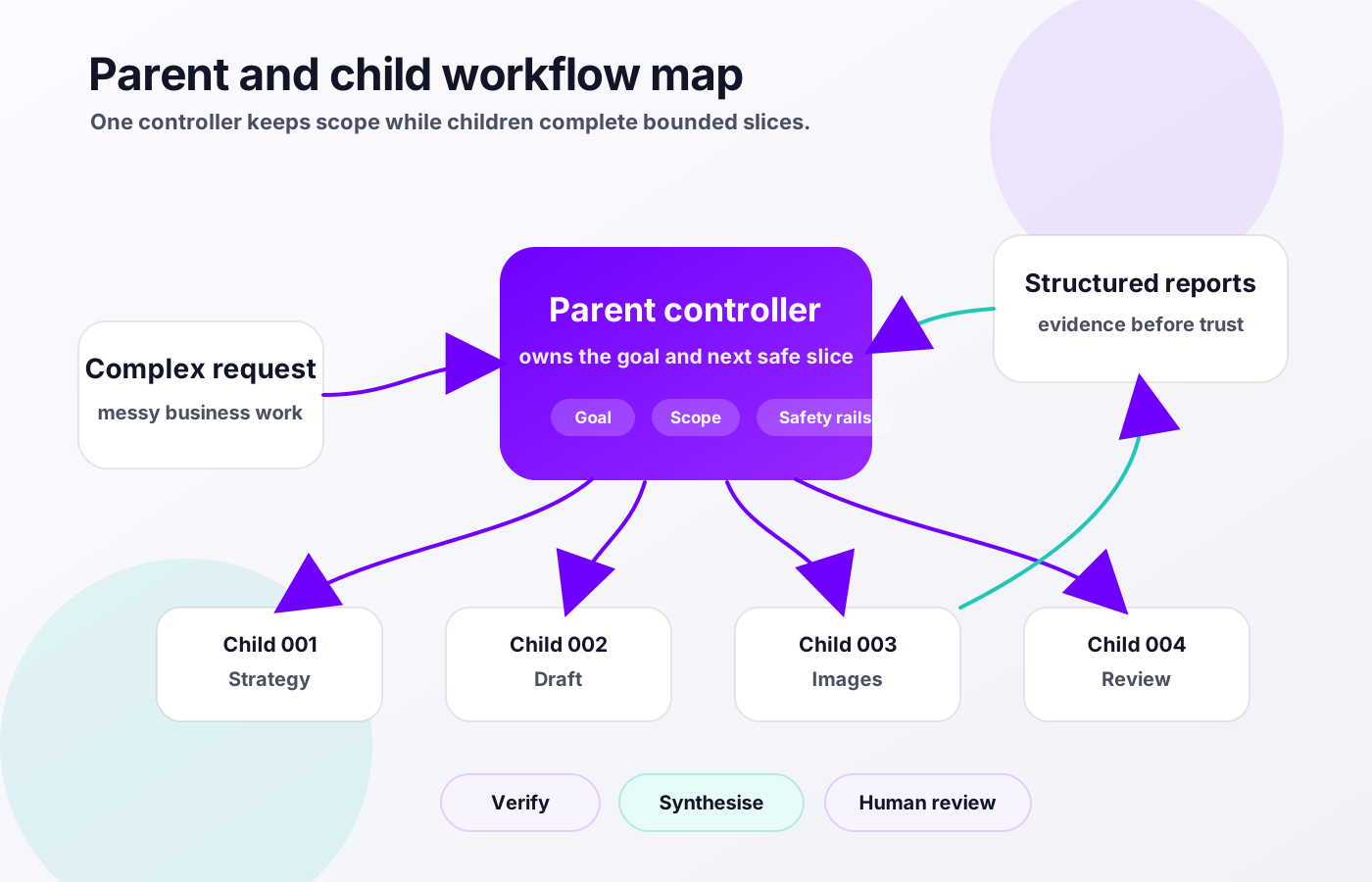
At CLCK, we are testing a more controlled pattern for this kind of work through our Hermes Agent operating layer. I think of it as a parent/controller plus child-worker workflow. The parent keeps the goal, scope and safety rails in view. Child workers take one bounded slice at a time. Each child reports back with evidence. The parent verifies, then decides the next safe step.
It is an MVP pattern, not a claim that we have solved unattended autonomy. But it already feels like a safer way to use AI for complex internal work.
The problem with asking one AI thread to do everything
A single AI thread is convenient. You can brief it once, keep talking, and let it carry context forward.
That is also the weakness.
Long threads can drift. The model may remember the direction of the work but lose the detail. It can anchor on an early assumption that should have been corrected. It can keep going because it has been asked to continue, even when the safer move would be to stop and ask for verification.
Complex business work also has hidden dependencies. A website article is not just writing. It has approved inputs, brand voice, image requirements, metadata, internal links, privacy checks, build checks and publishing boundaries. CRM work has properties, views, ownership rules, client data and live workflow risk. Reporting work has definitions, source systems and commercial consequences.
When one AI thread tries to hold all of that at once, the work can look productive while control quietly slips. That is the dangerous part. The output may be polished, but the process may be messy.
For business owners, the issue is not whether AI can produce content. It can. The issue is whether the work can be trusted when it touches real systems, real customers, real data and real decisions.
The parent/controller role
The parent is not the cleverest writer in the room. It is the project manager that refuses to let the work wander.
In this pattern, the parent owns the overall goal. It defines the source of truth, the boundaries, the acceptance criteria and the next safe slice. It decides what is in scope and what is not. It also owns the final synthesis.
The parent does not need to do every task itself. In fact, that would miss the point. Its job is to split the work into pieces small enough that each one can be completed, checked and understood.
A good parent task brief includes:
- The project and goal.
- The source of truth.
- The exact slice of work.
- What is allowed and what is blocked.
- The acceptance criteria.
- The verification needed before the task is treated as done.
That structure matters because AI is very good at filling gaps. Sometimes that is helpful. Sometimes it creates confident nonsense. The parent reduces the gaps before the child starts.
The child-worker role
A child worker gets one bounded task. Not the whole project. Not a vague invitation to improve everything. One slice.
For example, one child might create the article strategy. Another might draft the article. Another might prepare image concepts. Another might check links and metadata. Another might run the build and inspect the staged output.
The child inspects only what it needs. It changes only what is in scope. It stops if the task becomes unsafe, unclear or bigger than the slice it was given.
Most importantly, the child reports evidence, not vibes.
We use a simple report shape because it makes review faster:
- Outcome: what happened.
- Inspected: what the child looked at.
- Changed: what the child modified.
- Verified: what was checked.
- Risks: what still needs attention.
- Next: the recommended next step.
That paper trail is boring in the best possible way. It lets the parent see whether the child actually did the work, what evidence exists, and where a human or another child needs to check before anything moves forward.
Why the safe version is a durable queue, not a self-triggering chat loop
There is a tempting version of multi-agent work where one chat message triggers another chat message, which triggers another, and the system keeps going by talking to itself.
That is not the safe model.
A self-triggering chat loop can get stuck. It can keep creating work because the next message looks like progress. It can burn time and budget without getting closer to a verified result. It can also be hard to tell which task did what, which output belongs to which instruction, and where something went wrong.
The safer pattern is a durable queue.
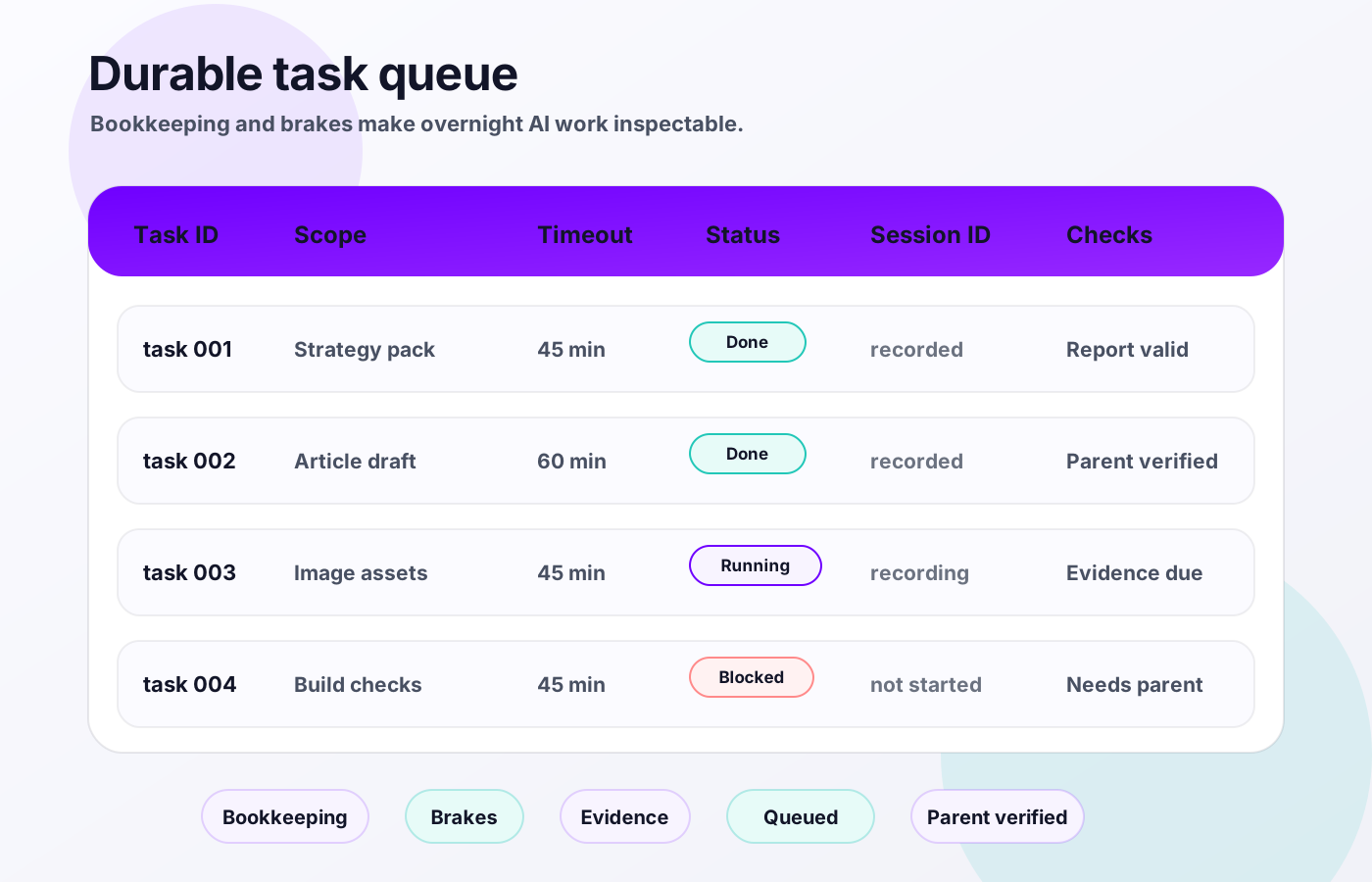
That means every task has an ID. It has a status. It has one owner. It has a timeout. It has recorded output. It has a required report shape. The parent can see what has run, what failed, what is waiting, and what needs verification.
If you want AI to work overnight, it needs bookkeeping and brakes. The bookkeeping creates visibility. The brakes stop a small mistake becoming a long, expensive mistake.
What this looks like in a real workflow
This article is a simple example.
The parent defines the goal: draft a CLCK website article from my perspective about parent and child workflows for complex LLM work.
One child creates the strategy and source pack. Another child drafts the article in the site format. Another child can create or source the images. Another can check links, metadata, privacy and copy rules. The parent then verifies the staged draft, checks the build output if needed, and decides whether it is ready for a human review.
The same pattern can apply to normal business operations:
- Preparing a CRM clean-up plan before anyone touches live records.
- Reviewing HubSpot reporting definitions before rebuilding dashboards.
- Creating sales research packs from approved sources.
- Checking proposals against a source scope before sending them to a client.
- Turning meeting notes into internal process documentation.
- Drafting website or knowledge base content with a separate review step.
The common thread is that the work is context-heavy, reviewable and safer when split into smaller pieces.
The theory underneath it, in plain English
There are a few ideas underneath this pattern, but you do not need to turn them into a research project to make them practical.
One distinction I find helpful is the difference between workflows and agents. A workflow follows a predetermined path. Step one, then step two, then step three. An agent is more dynamic. It can decide which tool to use, what to inspect and how to respond.
Business work usually needs both.
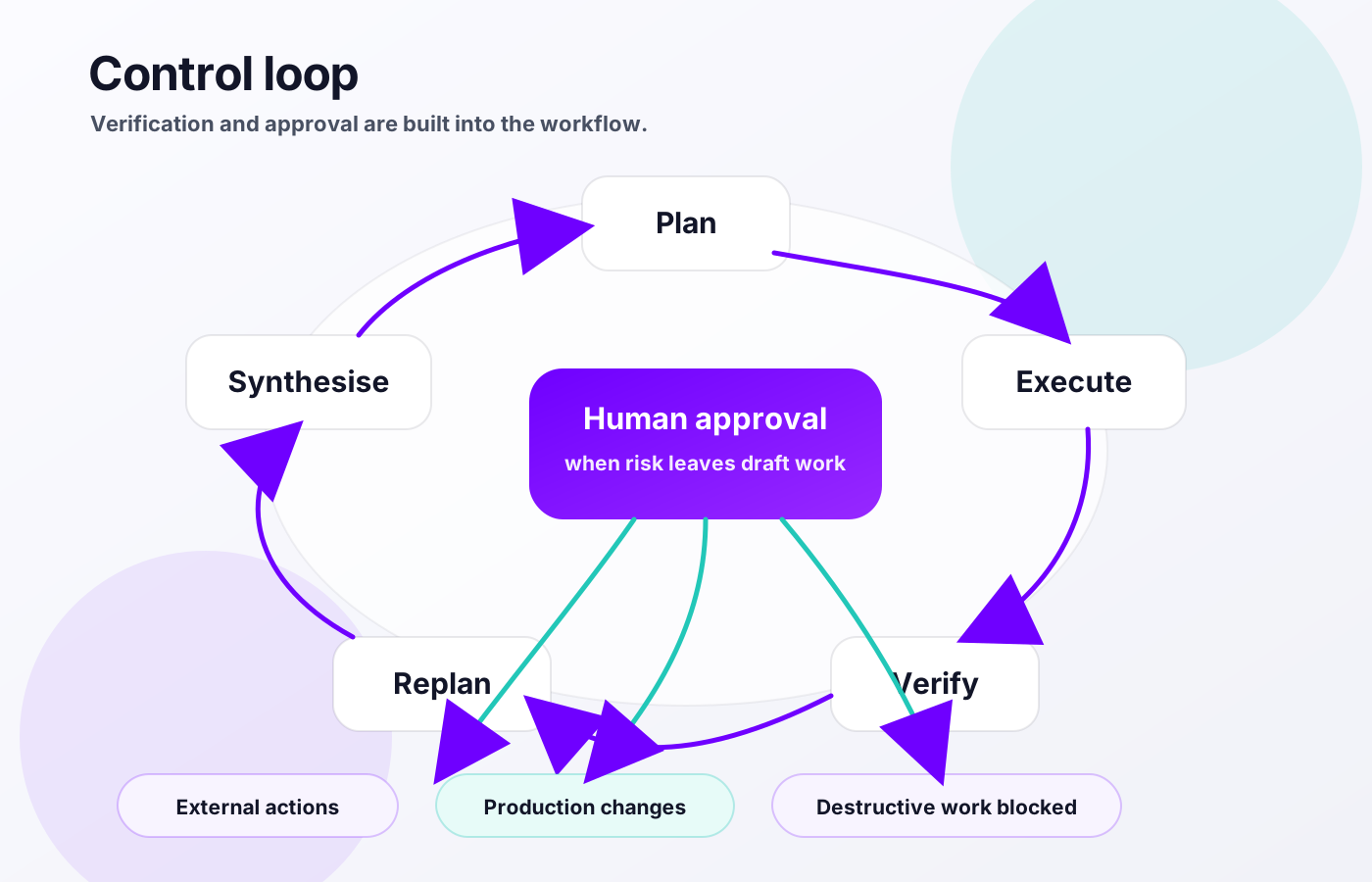
Some parts should be predetermined. External messages need approval. Production changes should be separate from draft work. Destructive actions should be blocked unless explicitly approved. Reports should use the same structure every time.
Other parts need judgement. Which source matters most? What is the safest next slice? Has the task become unclear? Does the output satisfy the brief or only look good at first glance?
Common AI workflow patterns also fit here. Prompt chaining breaks work into steps. Parallel work lets independent tasks happen at the same time. Routing sends the right task to the right worker. Evaluator loops check the output and ask for improvement where needed.
In multi-agent work, you will often see a simple loop: plan, execute, verify, replan, synthesise. The language varies, but the idea is the same. Do not just ask the agent to keep going. Ask it to plan, do a bounded piece of work, check it, adjust the plan, then bring the result back together.
What can go wrong without boundaries
This is not about being scared of AI. It is about being mature with it.
Without boundaries, a few things can go wrong quickly:
- Loops: the agent keeps triggering itself because every output creates another task.
- Duplicated work: two agents solve the same task in different ways.
- Collisions: two agents touch the same file, record or system at the same time.
- Scope creep: a child starts solving the parent problem instead of its assigned slice.
- Cascade failure: one bad assumption becomes the base for later work.
- Waste: the work keeps moving without a better result.
- External risk: an agent sends, publishes, deletes, deploys or changes client data without approval.
The answer is not to avoid AI work. The answer is to design the operating model so these failures are easier to prevent, spot and stop.
The simple checklist I would use before letting AI run overnight
If a business wanted to let AI handle longer internal work safely, I would start with this checklist:
- Every task has an ID.
- Every task has one owner.
- Every task has a narrow scope.
- Every task has acceptance criteria.
- Every child has a timeout.
- Every child returns the same report shape.
- The parent verifies before synthesis.
- External actions need human approval.
- Destructive work is blocked unless explicitly approved.
- Production changes are separate from draft work.
None of that is glamorous, which is why it works.
It turns AI from a clever chat into a controlled work system. Not fully autonomous. Not a replacement for judgement. A way to move through larger work without losing the thread.
Where this helps SMEs
For SMEs, the best AI workflows are not the flashiest ones. They are the workflows that are context-heavy, repetitive and reviewable.
That might be drafting, research, internal documentation, CRM audits, sales prep, website staging, reporting checks or meeting summaries.
It is not a good fit for unsupervised customer communication, legal judgement, financial decisions, production changes or sensitive client data without strong guardrails.
At CLCK, this matters because a lot of useful AI work sits across HubSpot, documents, Slack, campaign tools, project notes and website code. The value is not that the agent can type quickly. The value is that it can move through the work with context and still leave a trail we can check.
If you are trying to use AI inside your business and the demos keep falling apart when the work gets real, the first step is not buying another tool. It is designing the workflow around the tool. Talk to CLCK about a practical AI workflow if you want help working out where that should start.
What CLCK is testing
We are testing this as an operating pattern for our own work first.
That means using parent/controller briefs, bounded child tasks, a durable queue, consistent reports, timeouts, verification and human approval gates. It means separating draft work from production work. It means treating an overnight run as something to inspect in the morning, not something to blindly trust.
The goal is not to remove people from the process. The goal is to give people better leverage.
AI agents are becoming capable enough to do longer pieces of work. That does not mean they should be left alone with vague instructions. The better path is to give them a workflow: parent oversight, bounded child tasks, clear reports, timeouts, verification and human approval where it matters.
The future of practical AI inside a business is not one magic agent doing everything. It is a controlled operating model where the right work gets split up, checked and brought back together safely.