
AI fatigue is real, but this feels different
I’ve tested a lot of AI tools.
Some are useful. Some are toys. Some feel like paying $30 a month for a slightly more confident intern who has read the internet but still needs you to explain what your business actually does.
That is not really a criticism of AI. It is more a criticism of how most businesses are being asked to use it.
For a lot of people, AI still means opening a browser tab, typing a prompt into Claude or ChatGPT, copying the answer somewhere else, then fixing the bits that sound clever but are not quite right.
That can be helpful. But it can also become another tool to check, another login to remember, and another place where the work gets separated from the actual business context.
Over the last few weeks, the thing that has genuinely changed how we work at CLCK has not been one flashy AI app. It has been building an AI assistant into the operating layer of the business.
Not a public chatbot. Not a gimmick. Not a replacement for the team. Not a generic AI window that starts every conversation from zero.
More like a context-aware assistant that sits closer to the way the business actually runs.
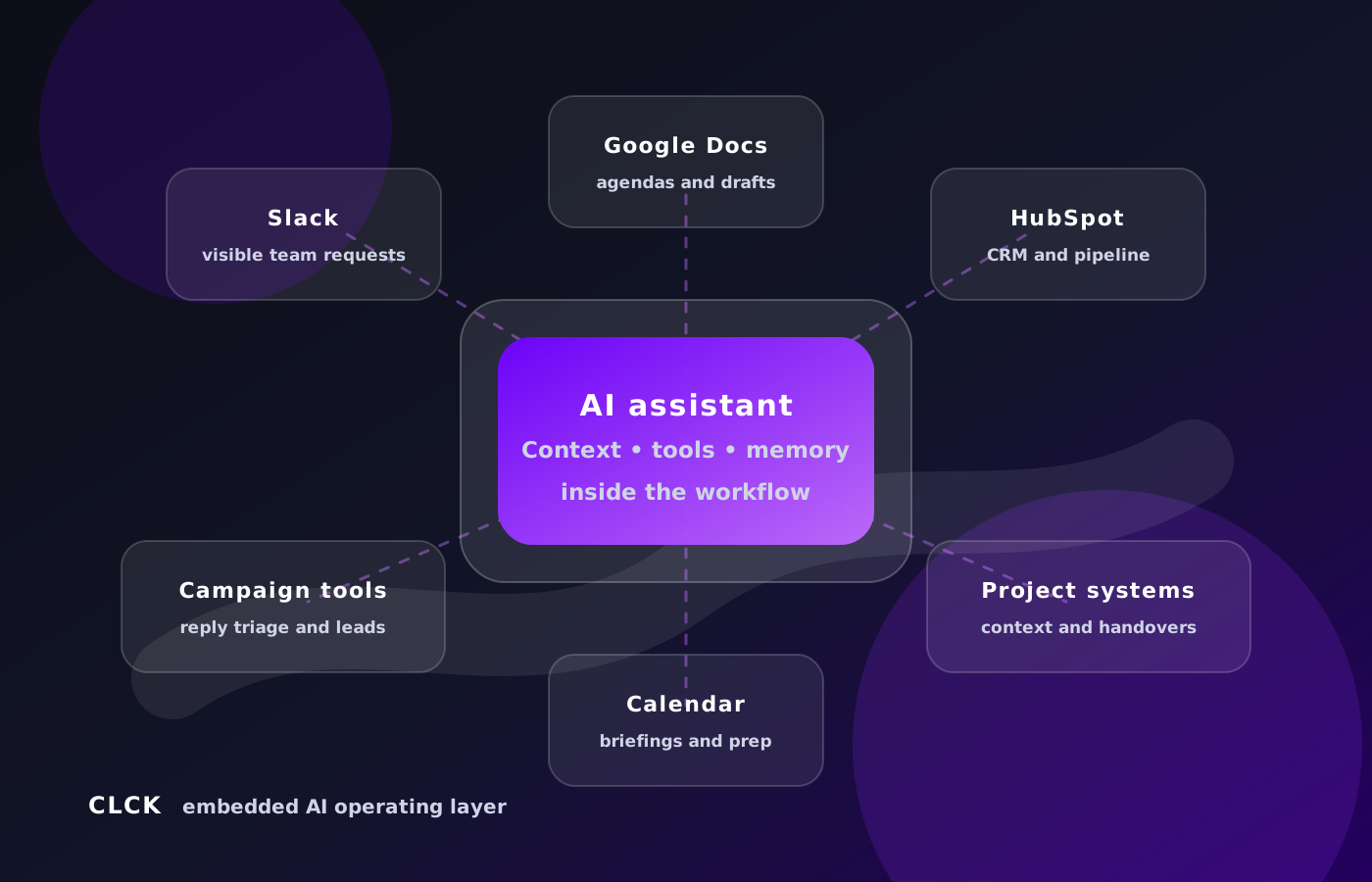
It lives where we work (in Slack in our case), so there’s visibility on who’s asking for what. And it has access to all the systems we use across our business, from HubSpot, Xero, project management tools, email/calendar, etc.
That distinction matters, because the next useful step for AI in a lot of businesses is not “let’s add another chatbot”. It is “how do we give the team a practical AI layer that understands our systems, our context, our standards and our way of working?”
Quick read
- An embedded AI assistant is not another chatbot. It sits across the tools and conversations where the work already happens.
- The useful part is context. It can work from CRM records, documents, Slack threads, notes and repeatable workflows instead of starting cold each time.
- The best starting point for SMEs is practical. Pick the annoying workflow that already costs time every week, such as meeting prep, follow-up, lead triage or CRM hygiene.
What we mean by an embedded AI assistant
The simplest way to explain it is this: imagine if a smart team member could sit across your CRM, documents, campaign tools, email drafts, meeting notes, MS Teams/Slack channels and internal processes, then help with the boring, repetitive or context-heavy parts of the work.
That is closer to what we mean by an embedded AI assistant.
Not just a tool you ask questions in isolation. But an assistant connected to the places where the work already happens.
For us, that means it can inspect context, draft documents, summarise information, review systems, build repeatable workflows and recommend sensible next steps. It can work with our internal notes, preferred ways of doing things, common client scenarios and the tools we already use.
It can sit in the same shared Slack channels the team uses. It can see the client thread where the work is being discussed. It can follow a request from Slack into the client’s Google Drive folder, check the relevant project or CRM records, review meeting notes, then come back with a useful answer or draft.
That is a very different experience from asking a chatbot a question in a browser tab.
The work is visible. The team can see what the assistant is doing. Someone can correct it in the thread. Everyone benefits from the answer instead of one person quietly doing the same research again later.
Just as importantly, it works with boundaries.
There are things it can inspect, draft and organise. There are things it should recommend but not execute. And there are things that need human approval before they happen, especially when they involve clients, external messages, live systems or commercial decisions.
That is the practical version of AI we are interested in: practical AI, not theatre.
The Slack layer changed the feel of it
One of the biggest practical unlocks has been putting the assistant where the team already works.
In our case, that means Slack.
The assistant can be brought into a client-specific channel or thread, where the conversation already has context. It does not need a huge briefing every time, because the surrounding messages, client name, project lane and team comments give it a starting point.
From there, it can help connect the dots.
It can look for the client’s Google Drive folder. It can find relevant Google Docs. It can check CRM or project-management records. It can review the latest meeting notes. It can pull in campaign context. It can draft a response, an agenda, a handover note or a task list.
The important part is not just that the assistant can do those things. It is that the work happens in the open.
The team can see the request, the answer and the assumptions. If it gets something slightly wrong, the correction happens in the same place everyone else can see. If the answer is useful, nobody has to ask the same question twice.
That has saved time in a very practical way.
Not because AI is replacing the team. Because it is reducing the amount of time the team spends hunting for context, re-explaining background, writing first drafts or agendas, and turning scattered information into something usable.
How the operating model works
Under the hood, our assistant is built around Hermes Agent, the open-source agent framework from Nous Research.
Hermes is similar to a tool that soared to popularity earlier this year - OpenClaw.
That matters because this is not just a chat window with a nicer prompt. Hermes gives us the operating layer around the model: memory, skills, tool access, scheduled jobs, messaging-platform support and the ability to work across local files, APIs, Google Workspace, HubSpot, campaign tools and project systems.
The model does the reasoning and writing. Hermes provides the business wrapper.
For CLCK, that operating model looks roughly like this:
- It lives where the team works, mainly Slack and Discord.
- It has controlled access to useful systems, such as Google Drive, Google Docs, HubSpot, Teable, campaign tools, local files and selected APIs.
- It uses reusable skills, so if we work out a better way to do something once, that workflow gets saved and reused later.
- It has durable memory for stable preferences and operating rules, but not a free-for-all memory of everything.
- It can run scheduled jobs, so useful checks happen automatically rather than waiting for someone to remember to ask.
- It works with human approval boundaries, especially before external messages, live system changes or anything destructive.
That last point is important. The goal is not “let the AI do whatever it wants”. The goal is to create a reliable operating layer where AI can do the context-heavy work, while people still own judgement, client relationships and final approval.
The economics changed quickly
The other surprising part has been the cost curve.
In one recent seven-day period, our Hermes usage report showed more than 1.5 billion total tokens across 425 sessions, 20,000+ messages and more than 10,000 tool calls.
That is not normal “ask ChatGPT to write a paragraph” usage. That is an assistant inspecting code, reading documents, searching past work, drafting, checking systems, improving the website, running scheduled jobs and helping across the business all week.
We are currently doing that through OpenAI’s ChatGPT/Codex subscription path rather than paying for every token directly through the normal API path. At roughly $100 a month, that works out at about $25 a week.
If the same workload were bought purely as direct API usage, the equivalent cost would be in the low thousands of dollars. Using published API token pricing, a billion-token workload can land around the $3,000 mark depending on the input/output mix and caching.
The exact number will vary. The point is the direction.
For SMEs, this is what makes the category interesting. The technology is getting more capable at the same time the operating cost is becoming realistic enough to actually use it inside the business every day.
And because of the arms race going on between companies like Anthropic and OpenAI, they’re competing for this growing “agentic” market by giving incentives to use their models.
Three real examples from the last week
Here are three examples of what this looks like in the real world.
1. Rebuilding the website from natural-language direction
We decided it was time for a website refresh because our old website was very much “we click buttons in HubSpot” rather than presenting us as the more strategic B2B growth partners that most clients now see us as.
Our site was built in WordPress, so our first approach was to get Arlo (that’s the name of our company agent) to go into WordPress and make adjustments.
But it became clear this was going to be much quicker and more efficient to simply get Arlo to build the site from scratch using static code rather than a traditional CMS.
So we’ve been rebuilding the CLCK website as a cleaner, faster, non-CMS Astro site.
A lot of that work has happened through natural-language direction rather than traditional web project handover documents.
We can say things like:
- “Make the first impression less like a HubSpot consultancy and more like a pipeline growth partner.”
- “Protect our HubSpot search visibility, but make outbound and lead generation stronger.”
- “This headline is too slogan-y. Make it clearer.”
- “Pull the HubSpot Platinum Partner proof above the fold.”
- “Add more images across the site.”
- “Now do an SEO review and make the site search engine friendly.”
From there, the assistant can inspect the codebase, sharpen the copy, improve the user journey, localise assets, update links and metadata, run the build, test the experience and prepare a review preview.
Over the last week, that has included clearer positioning, stronger service messaging, better HubSpot search coverage, sharper case studies, cleaner resources, SEO metadata, sitemap, schema and visual polish.
That does not mean the assistant “designs the brand” by itself. The strategic judgement still comes from us.
But it means the gap between a plain-English direction and a working site change has become much smaller.
For a small business, that is a big deal.
2. Creating client meeting agendas from real project context
Another example is our client meeting agenda workflow.
A basic AI summary of “recent emails” is not good enough for client work, because recent activity can be misleading. A project might have started with a larger scope, but the last few messages might only be about one narrow issue.
So we have been building the assistant to check deeper context before preparing agendas.
For a recent HubSpot implementation meeting, it did not just summarise the latest thread. It looked back into the project context and HubSpot quote/statement of work, pulled the original implementation goals back into view, then rewrote the agenda around what the client actually needed to progress.
That meant the meeting prep was anchored to the real scope, not just whatever happened to be discussed most recently.
The assistant can also create or update the Google Doc agenda in the right client folder and post a concise note back into the relevant internal Slack channel, so the team knows what is ready and where to find it.
That is the kind of workflow that sounds small until you realise how often teams lose time preparing for meetings by bouncing between calendar invites, CRM records, old proposals, folders, transcripts and Slack threads.
So now, at 3am every day, it checks the team calendars and prepares an agenda for every client meeting that day, posting it to the client’s specific Slack channel. It can tell from the meeting details whether it’s a client call or a sales call. For sales calls, it posts me a private running sheet with useful talking points, relevant context from prior notes and public sources, and likely next-step prompts.
3. Classifying campaign replies and updating lead views
We are also using Arlo to help build automations that support our own lead-generation work.
For client campaigns, inbound replies can come through tools like LinkedIn outreach or cold email platforms. Some replies are hot. Some are warm. Some are admin. Some are out of office. Some are hard no’s. Some need a human to review the nuance.
The old way is that someone checks the inbox, reads the reply, decides what it means, categorises the lead, maybe notifies someone, and hopefully remembers to keep the client-facing view clean.
The better workflow is a triage loop.
Replies are captured. The assistant helps classify intent. The lead can be marked as hot, warm, neutral, not interested, admin or needing review. The raw event stays in an internal log, while the client-facing lead status view stays cleaner and closer to one row per lead.
We now have recurring sync work running in the background to help keep those lead-status tables aligned from campaign reply data.
That is a practical example of the assistant not only doing work for us, but helping build the automations it then uses.
Again, this is not blind autonomy. We still care about approval, review and data quality. But the assistant can do a lot of the repetitive inspection, classification and routing work that would otherwise eat up team time.
The biggest lesson: context beats raw intelligence
The biggest lesson so far is that context matters more than raw intelligence.
The useful step is not making AI sound smarter. It is giving it enough business context to stop starting from zero every time.
A generic AI model can be impressive. It can write a decent paragraph, explain a concept and summarise a document. But if it does not know your business, your systems, your tone, your constraints or your history, it is still starting from a blank page every time.
That is why so many AI outputs feel almost useful.
They are polished, but slightly off. They are confident, but not quite grounded. They sound like they belong to some other company with a similar problem.
The breakthrough for us was not making AI “smarter”. It was giving it enough business context to stop starting from zero every time.
It can know that CLCK’s tone should be practical, direct and not AI-bro. It can know the difference between a HubSpot implementation project, a lead generation campaign and a strategic advisory conversation. It can know our preferred proposal structures. It can remember operating rules, like not sending external messages without approval and not deleting data without explicit confirmation.
It can also reuse workflows that have worked before.
That is a very different experience from prompting a generic chatbot and hoping the answer lands somewhere near the mark. It is the difference between asking a stranger for advice and asking someone who has been sitting in the business long enough to understand the shape of the work.
Why this matters for SMEs
This is where I think the opportunity gets interesting for small and medium-sized businesses.
Most SMEs do not have dedicated RevOps teams, full-time data analysts, internal automation teams, perfect documentation or beautifully clean systems.
They do have repeated questions, messy handovers, underused CRMs, slow follow-up, scattered context and too much knowledge stuck in people’s heads.
That is exactly where an embedded AI assistant can help.
Not by turning the business into a tech company. By closing some of the operational gaps that usually sit between people, tools and process.
- A sales-led business could use it for call prep, CRM summaries, follow-up drafting, pipeline hygiene and next-step prompts.
- A service business could use it for enquiry triage, internal knowledge support, proposal drafting, delivery handovers and client update summaries.
- A HubSpot user could use it for portal audits, workflow planning, lifecycle-stage cleanup, reporting briefs and sales process documentation.
- A lead generation business could use it for campaign monitoring, reply triage, message testing, prospect research and personalised outreach support.
None of those are science fiction. They are normal business workflows with better support around them.
The real opportunity is not AI as a novelty. It is AI as an operating layer that helps the business move faster without relying on everyone remembering everything all the time.
This is becoming the new business layer
I do not think every business needs to become an AI company.
But I do think every business will eventually need an AI layer.
Something that sits across the tools, understands the context, helps the team move faster and reduces the amount of operational drag between thinking and doing.
For some businesses, that might start with sales call prep and follow-up. For others, it might be HubSpot cleanup, internal knowledge search, lead routing, campaign monitoring or proposal drafting.
The right starting point is usually not the most futuristic workflow. It is the annoying one that already costs time every week.
The repeated question. The messy handover. The follow-up that gets delayed. The CRM review nobody has time to do properly. The process that lives in someone’s head instead of somewhere the team can use.
A simple starting point
Do not start with the most futuristic workflow. Start with the repeated question, messy handover or follow-up delay your team already feels every week.
That is where practical AI starts to earn its keep.
We are building this inside CLCK first because we want to understand it by actually using it, not just talking about it.
The next step is helping clients do the same.